Windows XP Windows 7 Windows 2003 Windows Vista Windows 綜合教學 Linux 系統教學
Windows 10 Windows 8 Windows 2008 Windows NT Windows Server 電腦軟體教學

Win10 無法調整音量問題解決:註冊表新增 systray.exe 開機啟動項

編輯:Windows 10 系統介紹

Windows 10 任務列音量圖示點擊無反應、無法調整音量,可透過登錄表新增 systray.exe 開機啟動項修復。

⚠️ 操作前建議建立系統還原點

修改步驟

  1. Win + R → regedit 開啟登錄表編輯器。
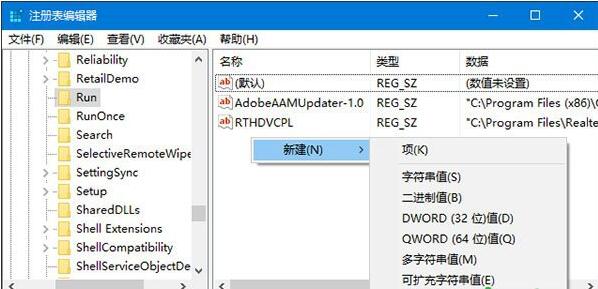
  2. 展開:HKEY_LOCAL_MACHINE\SOFTWARE\Microsoft\Windows\CurrentVersion\Run
  3. 右側空白處右鍵 → 「新增」→「字串值」→ 命名 systray.exe。
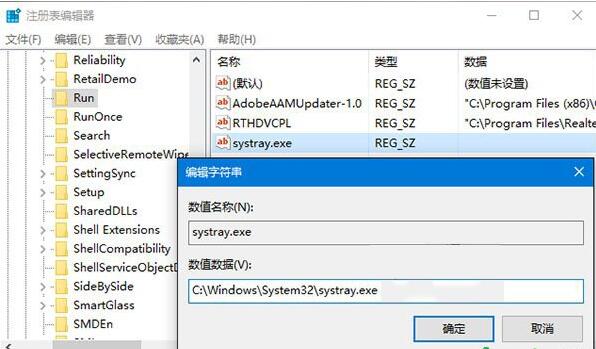
  4. 雙擊設定數值資料:C:\Windows\System32\systray.exe,確定。
  5. 重新開機,音量控制通常即可恢復正常。

此問題常因系統更新導致 systray.exe 開機啟動項遺失,手動補回即可修復。若無效,請檢查音訊驅動程式或嘗試重新安裝聲卡驅動。

Copyright © Windows教程網 All Rights Reserved