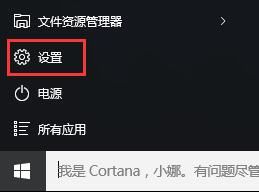
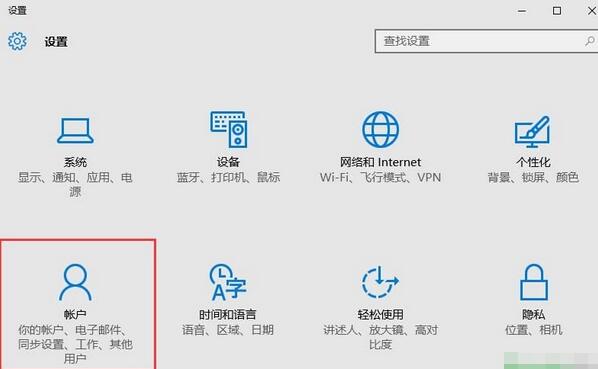
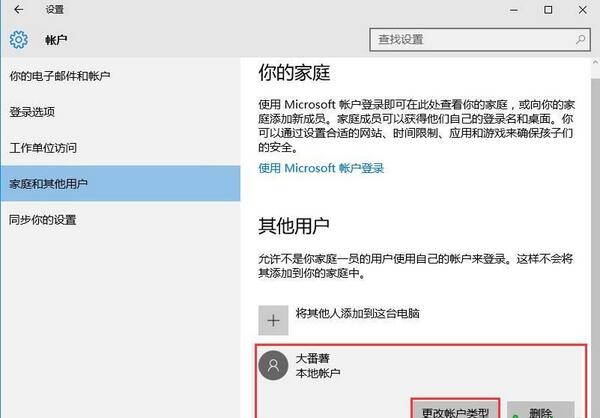
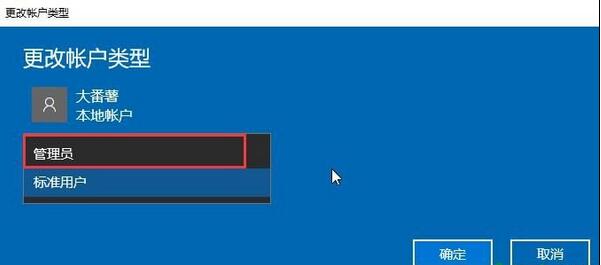
需以系統管理員身分執行特定任務時,可將本機標準帳戶提權為管理員。
生效即刻,該帳戶即擁有完整系統管理權限。
Win10 睡眠喚醒黑屏無反應?關閉「快速啟動」一招解決
Win10 如何共享資料夾給區域網路其他電腦
Win10 Mobile 10581 更新下載卡 0% 解決辦法
Win10 查看 MAC 地址的兩種實用方法
移除 Win10 任務列升級提示圖示暫時與永久方案
Win10 在「主資料夾」導覽窗格加入「程式庫」:註冊表新增 DelegateFolders 兩處鍵值
Win10 DVD 播放器常見問題與解決方案:影片不順、換片不播、偵測不到光碟、自動開商店、音效/HDMI 問題
Win10 藍屏提示 PAGE_FAULT_IN_NONPAGED_AREA 怎麼解決?關閉快速啟動修復教學