Win10 執行 NBA 2K15 閃退、無法啟動,需補齊執行庫、更新驅動、設定獨顯強制高效能模式。
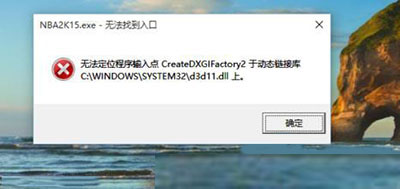
CommonRedist 下安裝 DirectX、VC++ 2010/2012/2013/2015-2022 (x64/x86) 所有執行庫。同樣原理適用於舊版遊戲、Unity/Unreal 引擎遊戲在雙顯卡筆電上無法正確呼叫獨顯的情況。
Win 10 執行《神界:原罪 2》藍屏?檢查補丁、重裝遊戲、換記憶體三步驟
Win 10 螢幕解析度無法調整?透過 Windows Update 更新顯示卡驅動程式解決
Win10 如何使用內建「快速入門」應用?功能類似 Win7 說明與支援,圖文並茂引導新手
Win10 玩遊戲畫面花屏/閃爍?相容性設定「停用高 DPI 顯示縮放」即可修復
Windows 10 網路位置設定 (私人/公用) 教學:透過設定應用程式快速切換
Windows 10 內建錄音機使用教學:開始→所有應用→Windows 配件→錄音機
Win10 自訂檔案總管開啟預設頁面:使用捷徑取代預設「常用資料夾」
Win10 升級 Build 9879 圖文教學:掛載 ISO → 執行 setup.exe → 保留個人檔案/應用/無保留三選一