Win10 更新下載的暫存檔預存放於 C:\Windows\SoftwareDistribution\Download,更新失敗或空間不足時,清理此資料夾可強制重新下載、釋放數 GB 空間。另有「磁碟清理」圖形介面備選。
方法一:手動刪除暫存資料夾(最徹底)
- 檔案總管貼上路徑:
C:\Windows\SoftwareDistribution\Download
- 全選 → Shift+Del 永久刪除(需管理員權限)
- 重開機後 Windows Update 會自動重建資料夾並重新下載
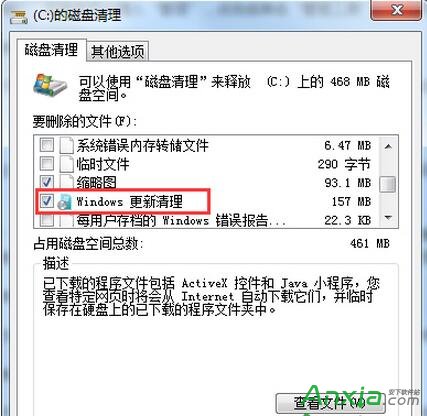
方法二:磁碟清理內建選項(較安全)
- 右鍵 C: →「內容」→「磁碟清理」
- 掃描完成 → 勾選「Windows 更新清理」
- 「確定」→「刪除檔案」
注意事項
- 刪除後下一次檢查更新會重新下載,網速慢者請在非尖峰時段操作
- 若更新卡在特定 KB,刪除暫存後常能解決 0x80070xxx 等錯誤碼
- 系統資料夾
SoftwareDistribution 其餘子資料夾(如 DataStore)勿動,僅清 Download