Windows XP Windows 7 Windows 2003 Windows Vista Windows 綜合教學 Linux 系統教學
Windows 10 Windows 8 Windows 2008 Windows NT Windows Server 電腦軟體教學

Win10 可能限制網速?關閉 TCP 窗口自動調整提升速度實測

編輯:Windows 10 系統介紹

背景

Windows 自 Vista 起引入 TCP 窗口自動調整 (Receive Window Auto-Tuning),預設啟用 (Normal)。部分環境下關閉反而能提升網速。

檢查現狀

  1. 右鍵「開始」 → 「命令提示字元」
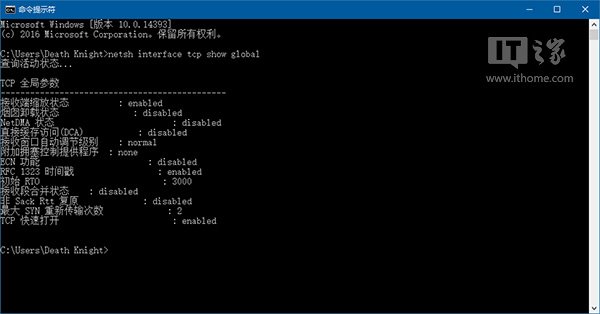
  2. 輸入:netsh interface tcp show global
  3. 觀察「接收視窗自動調整層級」是否為 normal

TCP 全域參數

顯示 normal

關閉自動調整 (需管理員權限)

  1. 右鍵「開始」 → 「命令提示字元 (系統管理員)」
  2. 輸入:netsh int tcp set global autotuninglevel=disabled
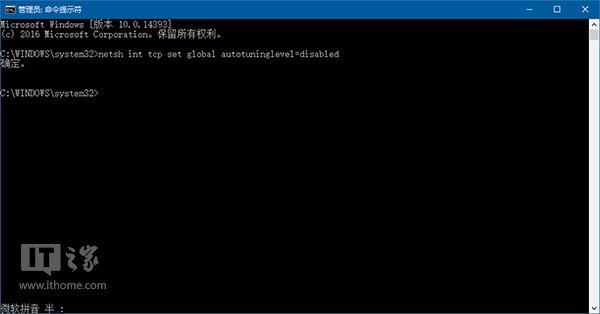
  3. 出現「確定」訊息即生效

關閉自動調整成功

驗證

重新執行 netsh interface tcp show global,確認層級顯示 disabled。實測部分環境下網頁載入、下載速度有明顯提升。

恢復預設

執行 netsh int tcp set global autotuninglevel=normal 即可還原。

Copyright © Windows教程網 All Rights Reserved