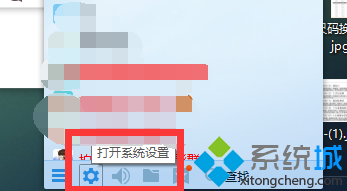
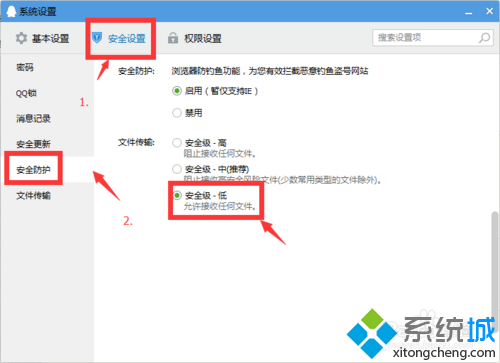
Windows 10 下 QQ 群檔案下載失敗,通常是 QQ 內建安全等級設定過高攔截下載。降低安全等級即可解決。
調整後下載應不再被攔截。注意:降低安全等級可能增加惡意檔案風險,建議下載完成後恢復較高等級。
Windows 10 如何禁止收集個人資訊?關閉診斷資料與 Cortana 一步到位
Win10 開啟 IE 導致電腦死機?刪除 .lnk 關聯登錄值修復
Windows 10 ShellExperienceHost.exe 當機解決方案:關閉自動更換桌布
Win10 Realtek 驅動更新失敗?暫時關閉 UAC 用戶帳戶控制即可安裝
Win10 vs Win7 效能實測對比:誰更快?
Win10 開啟 Word 跳出「安全性警示」視窗?停用巨集功能即可解決
Win10 刪除休眠檔案 hiberfil.sys 釋放 C 槽空間:powercfg 指令完整教學
Windows 10 如何加入網域?兩種方式:系統屬性與設定應用程式