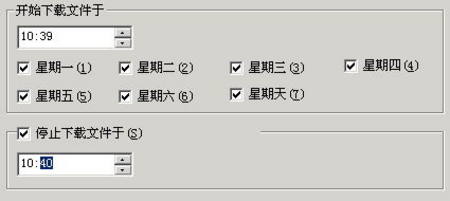
FlashGet「完成後關機」不僅下載完關機,還能純定時關機。
https://tools.yesky.com/download.rar
圖 1
無需下載實際檔案,單純利用排程功能定時關機,方便又實用。
網路螞蟻無法監控下載?開啟監視功能與路徑檢查
如何將 360 瀏覽器設為預設瀏覽器?五種方法任選一
IE 持續彈出「指令碼錯誤」視窗?完整排除流程與修復指令
Win8/Win10「開始」畫面找不到 IE10/IE11 圖標?重新釘選到開始畫面兩步驟搞定
MyIE 使用經驗:惡意彈出視窗下保留有用分頁的急救法
Foxmail 通訊錄快速遷移兩大法:匯出入 vs 直接複製資料夾
微信流量消耗詳細數據表:語音、視訊、圖片、文字各多少?
比特幣是什麼?從挖礦原理到交易運作完整解析