Windows XP Windows 7 Windows 2003 Windows Vista Windows 綜合教學 Linux 系統教學
Windows 10 Windows 8 Windows 2008 Windows NT Windows Server 電腦軟體教學
您现在的位置: Windows教程網 >> Windows教程 >  >> 電腦軟體教學 >> 網路工具

Firefox 2 狂佔 CPU 解決辦法

編輯:網路工具

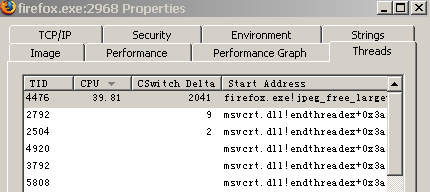
Firefox 突然間歇性佔用 50% CPU,系統回應極慢。Process Explorer 發現單一 PID 大量佔用 CPU 上下文切換資源,堆疊顯示 jpeg_free_large。

Google 發現可能與 Apple QuickTime 外掛有關。Firefox 安裝目錄 Plugins 下確有多個 QuickTime 相關外掛檔(版本號不同)。全部刪除 後重啟 Firefox,問題解決。
使用 iPhone 的用戶較易中招(因安裝 iTunes 會裝 QuickTime)。


Copyright © Windows教程網 All Rights Reserved