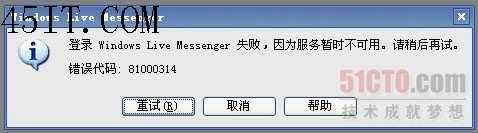
MSN 登入失敗提示錯誤碼 81000314。解決:
81000314
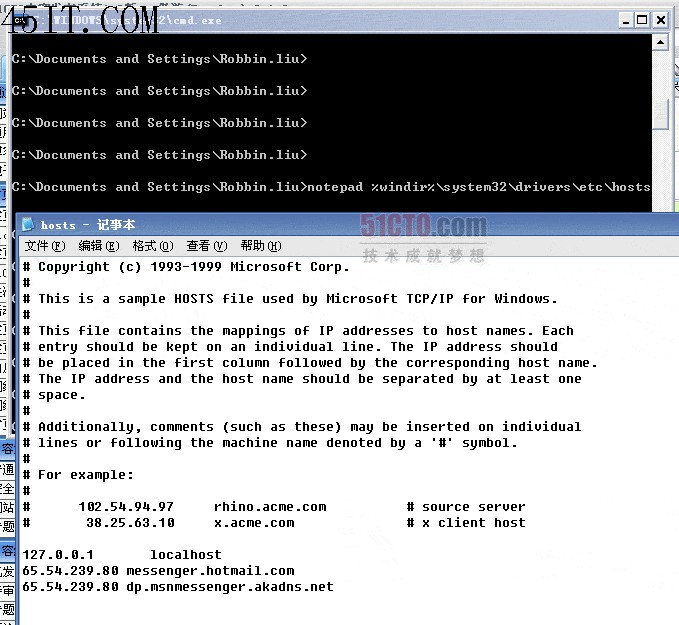
cmd.exe
notepad %windir%\system32\drivers\etc\hosts
65.54.239.80 messenger.hotmail.com
65.54.239.80 dp.msnmessenger.akadns.net
原理:MSN 伺服器故障,修改本機 HOSTS 指向可用伺服器 IP 即可繞過。
網絡螞蟻與 FlashGet 換膚去廣告全攻略:ini 修改背景、UltraEdit 修改 exe 除廣告條
搜狗瀏覽器 5.0 切換兼容/高速模式雙重教學:右鍵選單與地址列雙入口
Win7 關閉 IE 加速器功能:透過群組原則一鍵停用
IE 無法顯示 PNG 圖片(顯示紅 X)解決方案:pngfilt.dll 遺失或未註冊
百度貼吧簽名檔設定完整教學:從資格到審核全流程
360 瀏覽器「收藏到雲盤」工具條怎麼關閉?兩處設定徹底禁用
農業銀行網銀提示安裝安全控件卻無法登入?IE11 相容性視圖解決
網路執法官是什麼?區域網監控、MAC 綁定、ARP 防禦、代理偵測全功能解析