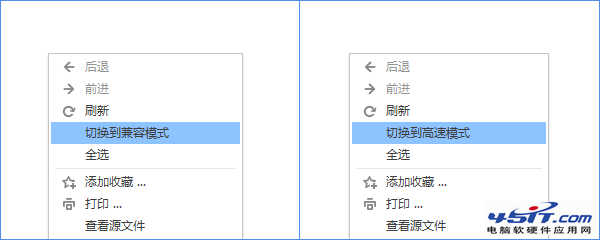
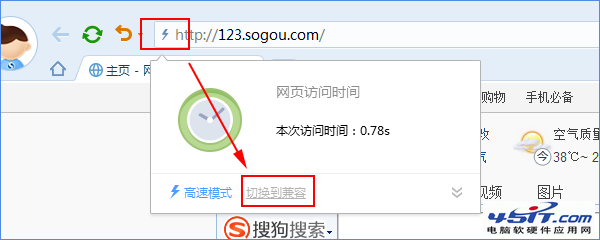
搜狗瀏覽器 5.0 雙核引擎支援一鍵切換渲染模式,提供兩種快速入口:
在網頁空白處按滑鼠右鍵,選擇「切換到兼容模式」或「切換到高速模式」。
點擊網址列左側的加速器圖示(閃電/楯牌圖標),同樣可選擇切換模式。
兼容模式 (IE 核心) 適合舊版網銀、政府網站;高速模式 (WebKit/Chromium 核心) 適合現代網頁,視情況切換即可。
迅雷「下載全部連結」一鍵抓取歌手全盤 MP3
瀏覽器下載提示「發行者未知」?一鍵關閉驗證提示
Foxmail 在 Windows 下批次加入附件四大絕招
IE 被惡意修改標題列、首頁、右鍵選單?註冊表修復大法還原乾淨瀏覽器
eMule (電騾) 瘦身優化:關閉歡迎視窗、簡化介面、限制頻寬、停用統計圖表、降低進程優先級
iPhone 6 微信返回鍵失效怎麼辦?iOS 8.2 相容性問題暫時緩解方案
Outlook Express 郵件規則:直接在伺服器刪除非本人收件垃圾郵件、撤回誤寄郵件
飛信號不變能否換綁聯通/電信手機號?實測僅支援移動號碼