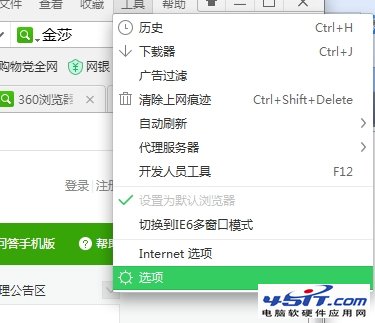
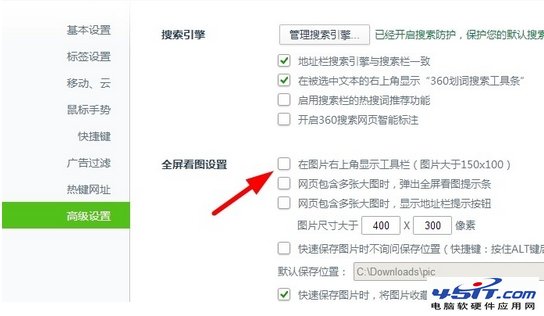
360 安全瀏覽器滑鼠懸停圖片時彈出「收藏到雲盤」工具條極干擾,需在兩處關閉:
圖:收藏到雲盤工具條
圖:移動與雲設定
圖:高級設定關閉圖片工具列
雙重關閉後,瀏覽圖片不再彈出任何工具條,乾淨舒心。
微信朋友圈純文字發布教程:長按右上角相機圖標 2 秒進入文字模式
飛信積分獲取全攻略:線上時長、發簡訊/彩信、邀請好友、訂購服務詳解
MSN/MSN Messenger 快速申請全流程:官網、軟體、第三方郵箱三大管道圖文詳解
新浪微博關注失敗/系統繁忙?兩大原因與解決方案
BT 種子搜尋實戰技巧:軟體搜尋、專用引擎、內建資源庫三管齊下
WinGate 代理伺服器進階設定與應用技巧(四)
支付寶臉部辨識支付怎麼用?掃臉付款流程體驗
Extended Talk 讓 Gtalk 功能倍增:檔案傳輸、圖片發送、動態狀態、表情符號、老闆鍵、透明視窗、桌面好友等 11 大功能詳解