中國用戶訪問 google.com 常自動跳轉 google.cn。Google 解釋為提供更針對性中文服務,但用戶可透過修改瀏覽器預設語言禁止跳轉。
google.com
google.cn
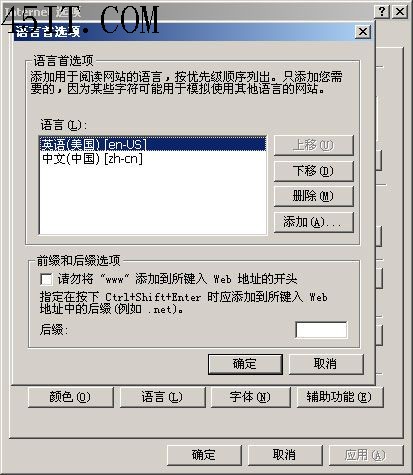
「工具」→「網際網路選項」→「一般」→「語言」→「新增」→選 英語 (美國) →移至最上方設為預設語言。
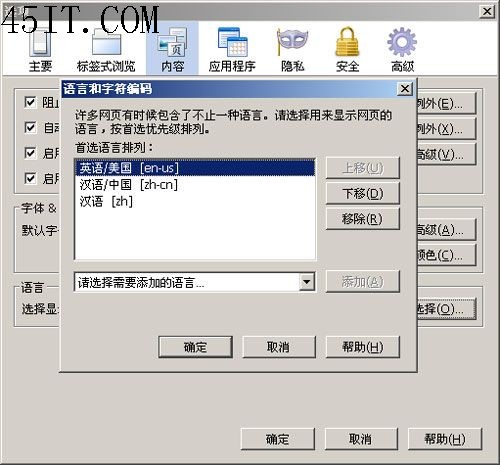
「工具」→「選項」→「內容」→「語言選擇」同樣將英語 (美國) 移至最上方。
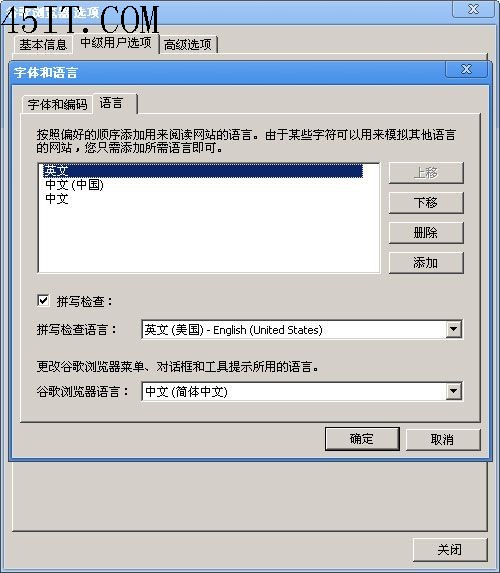
「選項」→「進階」→「更改字型與語言設定」→「語言」同樣操作。
設定完成後訪問 google.com 即不再自動跳轉 google.cn。
阿里旺旺收不到訊息、介面空白?四大排查步驟修復
迅雷/QQ旋風離線下載可以關機嗎?答案是:完全可以!
IE9 網銀密碼框異常?開啟相容性檢視即可解決
關閉 IE「允許網頁存取剪貼簿」提示框
Foxmail 報錯「Status3 遠程系統拒絕網絡連接」完整修復指南
迅雷看看自動跳過片庫影片片頭廣告:開啟「自動跳過片庫影片的片頭部分」
IE10 不顯示圖片?三大故障類型對應解決方案
解決 Foxmail 錯誤顯示新郵件的問題