IE9 瀏覽網頁僅顯示空白白畫面,多半由第三方外掛/工具列導致。執行重設 Internet Explorer 設定可快速修復。
重設步驟
- 關閉所有 IE 視窗與檔案總管視窗。
- 啟動 IE9(開始搜尋列輸入
Internet Explorer 按 Enter)。
- 齒輪圖示 →「Internet 選項」→「進階」索引標籤 → 按「重設」。
- 視需求勾選「刪除個人設定」→「重設」→ 完成後「關閉」→「確定」→ 重啟 IE9。
 圖 1:從開始搜尋啟動 IE9
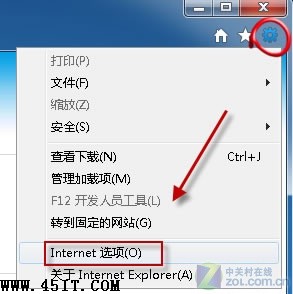 圖 2:開啟 Internet 選項
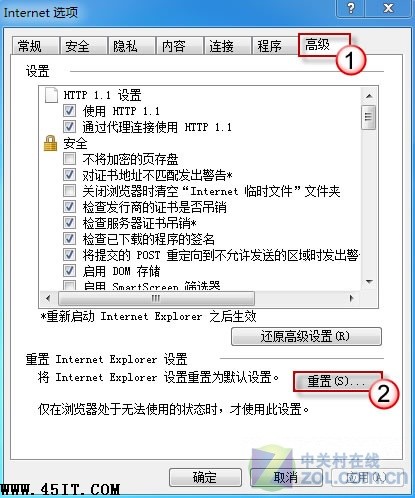 圖 3:進階索引標籤點選重設
重設將停用所有外掛、工具列、自訂設定,恢復預設安全性與隱私等級,是解決白畫面、當機、無法開頁的通用良方。