Windows XP Windows 7 Windows 2003 Windows Vista Windows 綜合教學 Linux 系統教學
Windows 10 Windows 8 Windows 2008 Windows NT Windows Server 電腦軟體教學
您现在的位置: Windows教程網 >> Windows教程 >  >> 電腦軟體教學 >> 網路工具

Foxmail 收信報錯「The capacity of each mail box should not exceed 2G」郵箱超容量解決方案

編輯:網路工具

錯誤含義

Foxmail 單個郵箱資料檔(.box)超過 2GB 上限,導致無法繼續接收新郵件。
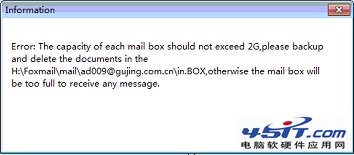
Foxmail 2G錯誤提示

解決步驟

  1. Foxmail 中按「大小」排序,找出佔用空間最大的郵件(通常含大附件),刪除無用郵件。
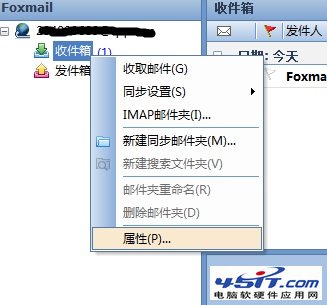
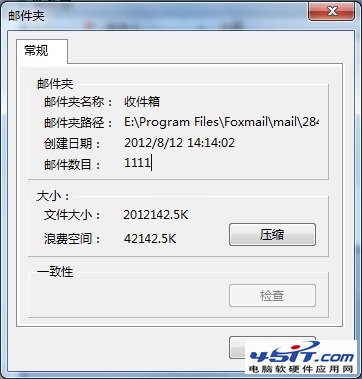
  2. 右鍵點擊「收件箱」/對應資料夾 →「屬性」→ 點擊「壓縮」。
  3. 壓縮完成後,釋放已刪除郵件佔用的物理空間,.box 檔案體積縮減。
  4. 再次點擊「收取郵件」,恢復正常。

Foxmail資料夾屬性
壓縮資料夾

預防建議

  • 定期清理垃圾郵件/大附件,或將附件另存本地後從郵件中移除。
  • 將舊郵件歸檔至獨立資料夾/導出為 .eml/.mbox 存檔。
  • 關注資料夾大小,接近 1.5GB 時主動壓縮/清理。
Copyright © Windows教程網 All Rights Reserved