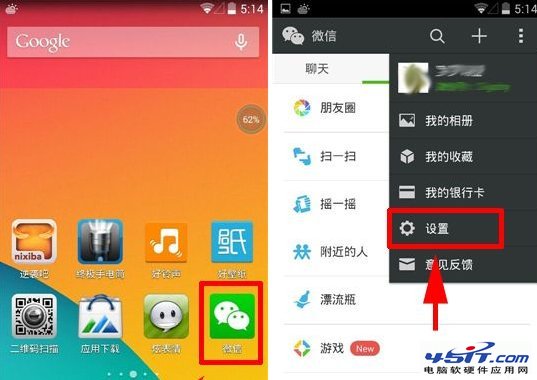
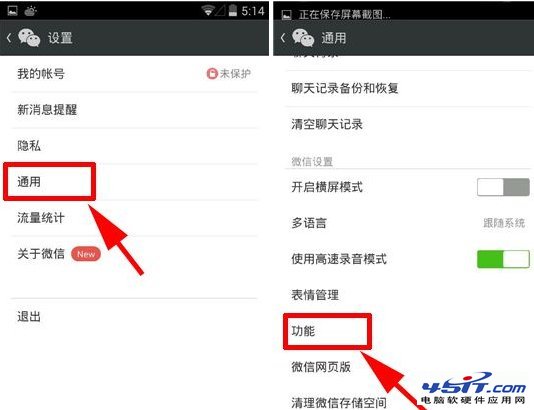
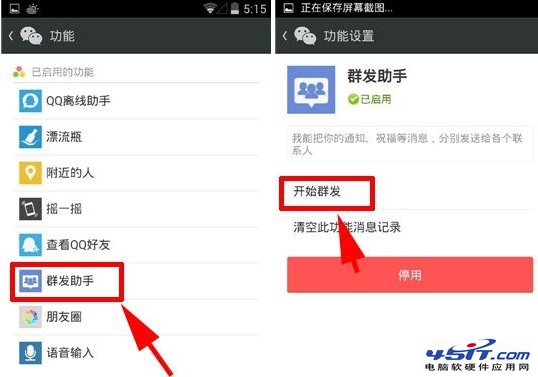
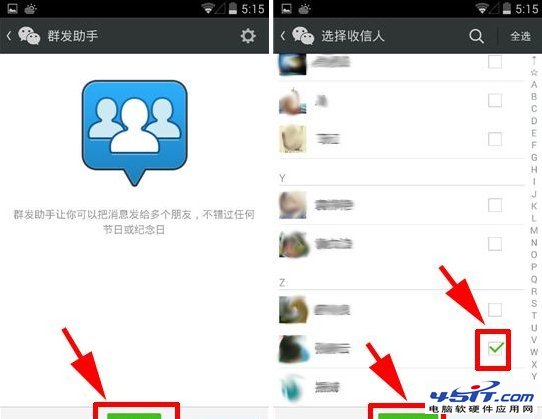
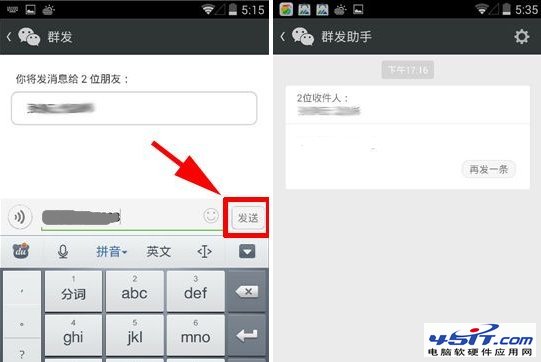
微信「群發助手」可一次向多位好友發送相同內容,適合節日祝福、活動通知:
注意:群發訊息會顯示「via 群發助手」,建議內容個性化、控制頻率,避免被好友屏蔽/投訴。
360 瀏覽器首頁修改不了?雙重解鎖:瀏覽器設定 + 360 安全衛士主頁鎖定
IE11 安裝失敗怎麼辦?先修復 Windows Update 再安裝成功率大增
IE 瀏覽網頁字體變大、排版亂碼?原來是「高對比度」惹的禍
MSN/MSN Messenger 快速申請全流程:官網、軟體、第三方郵箱三大管道圖文詳解
i酷加速器安裝與使用圖文教程:優酷視頻加速、斷點續播、共享目錄設定
Firefox(火狐)瀏覽器完整快捷鍵大全
全面認識 IE 瀏覽器外掛:從官方到第三方的實用擴充
電子郵件運作原理圖解:SMTP 發送、POP3/IMAP 接收全流程