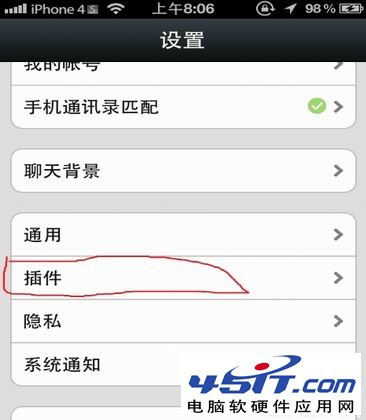
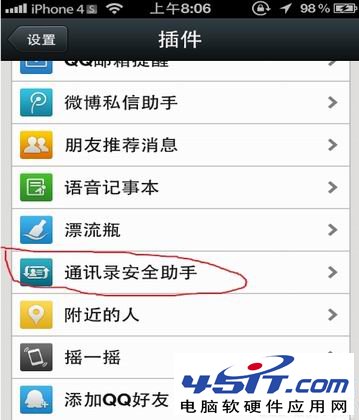
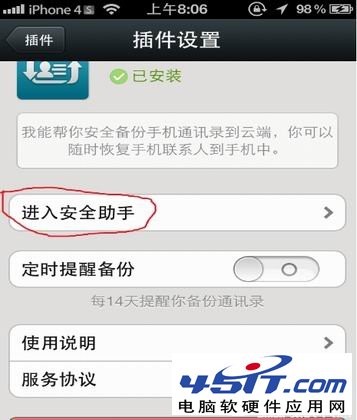
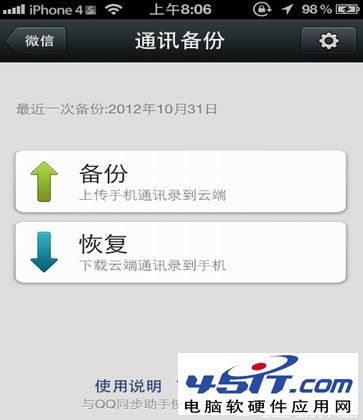
微信內建「通訊錄安全助手」可將手機通訊錄加密備份至雲端,換機/換號不再愁:
備份後可在新手機登入同一微信帳號,透過安全助手一鍵恢復,資料安全加密傳輸。
迅雷下載實用四大妙招:提速、音樂搜尋、硬碟保護、檔案管理
微信刪除好友後,對方還能看朋友圈嗎?三種隱私保護對比
微信不顯示圖片怎麼辦?清理存儲空間無效,重裝微信秒解決
用 IE 快速登入 FTP 網站:收藏夾攜帶帳密技巧
Outlook 2010 行事曆提醒點「消除」無回應?卸載 KB2553406 更新即解
MSN 帳號格式詳解:使用電子郵件地址登入
WinGate 代理伺服器進階設定與應用技巧(一)
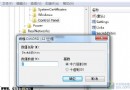
IE8 鎖定網頁字型為微軟正黑體:修改登錄 Use My Stylesheet=1 防止被第三方/他人竄改