下載的影音檔無法播放?嘗試 All Media Fixer 修復:
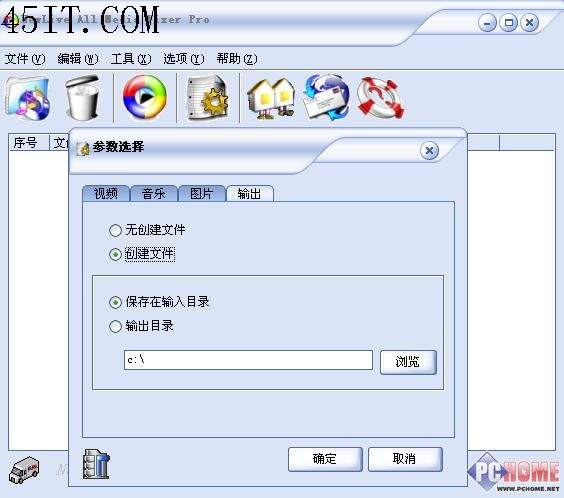
執行軟體 → 點「參數選擇」(F9) → 選修復模式(視頻/音樂/圖片)或「自動處理」 → 切「輸出」標籤設定修復後檔案保存路徑。
點「添加媒體文件」(F2) 載入待修檔案 → 移除不需修項目 → 點「開始檢查並修正」(F5) → 修復完成後嘗試播放,通常即可正常。
支援格式廣泛,為損壞媒體檔案的急救良方。
新浪直播插件反復安裝無法觀看解決:Livedeamon 服務啟動
RealMedia Editor 使用詳解:RM/RMVB 分割、合併、加版權、關鍵幀防卡頓
DXF 格式詳解:AutoCAD 數據交換標準及打開軟件推薦
美圖秀秀一鍵加邊框教學:輕鬆打造專屬照片風格
音頻指紋匹配歌詞:原理與優勢詳解
百度影音截圖功能:右鍵選單「截圖→截取當前圖像」,自訂儲存路徑
iTools 提示「發現有線設備」卡住解決:啟動 Apple Mobile Device 服務
暴風影音播放記憶設置:高級選項→播放設置→播放記憶啟用