安裝軟體時跳出「Windows Installer 服務無法存取」、「安裝錯誤」、「檔案正在使用請重開機」?這都是 Windows Installer (MSI) 引擎故障的典型表現。本文歸納三大故障類型與對應修復方案,涵蓋 98/2000/XP 系統。
現象: 安裝 ACDSee 5.0、Daemon Tools 等採用新版 MSI 技術的軟體時提示「安裝錯誤」。
原因: Win98/Win2000 早期版內建 MSI 版本太舊 (1.x),不支援新版安裝包。
解決: 下載安裝 Windows Installer 2.0 或更新版本 (Microsoft 官網免費提供),重開機後即可正常安裝。
現象: 安裝/修復 Office 時出現:
原因: MSI 核心檔案 (msi.dll, msiexec.exe, msihnd.dll) 損壞、遺失或登錄錯誤。
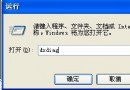
regedit,檢查 HKEY_LOCAL_MACHINE\SYSTEM\CurrentControlSet\Services\MSIServerImagePath 字串值包含正確路徑:
C:\Windows\System32\msiexec.exe /V
# (若無此值請新增)
msiexec /regserver 按 Enter# XP/2K:
attrib -r -s -h C:\Windows\System32\dllcache
# 98:
attrib -r -s -h C:\Windows\System
ren msi.dll msi.old
ren msiexec.exe msiexec.old
ren msihnd.dll msihnd.old
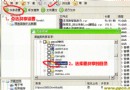
exit 重開機,Windows 會從 dllcache 或安裝源自動還原最新版本現象: 提示「某個檔案正在使用」,實際上常為殘留鎖定或預覽機制。
解決:
安裝報錯
   │
   ├─ 新軟體/新版 MSI → 更新 Windows Installer 2.0+ → 解決
   │
   ├─ Office/系統元件報「服務無法存取」
   │    │
   │    ├─ msiexec /regserver (安全模式) → 解決
   │    │
   │    └─ 替換 msi.dll/msiexec.exe/msihnd.dll → 解決
   │
   └─ 「檔案正在使用」 → 重開機/安全模式/關閉鎖定程式 → 解決