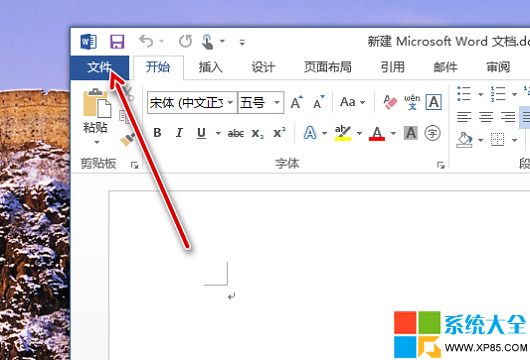
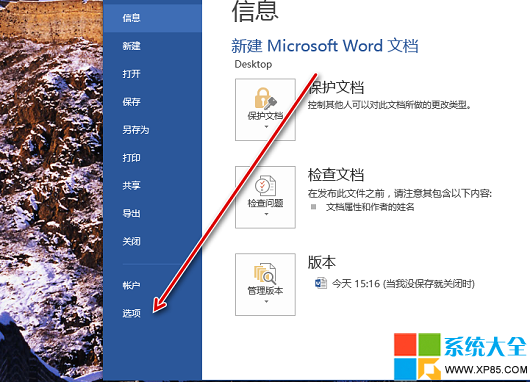
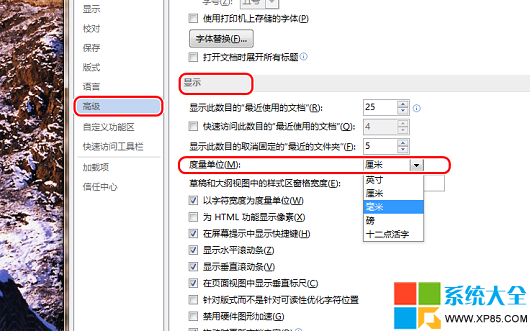
Word 預設使用公制單位(公分),但排版特殊文件時可能需要英吋、皮卡、點等單位。以下簡單兩步驟即可切換:
設定完成後,標尺、頁面邊距、縮排等數值即會以新單位顯示與輸入。
逆戰「僵屍獵場最難過哪一關」論壇話題活動:回帖贏薔薇禮包 30 天、獵魔執照 7 天、刑天 15 天
Win7 任務排程器不執行?路徑參數與最高權限雙重修復,讓自動備份/升級不再失效
獵豹瀏覽器手機版收藏夾設置教程
360 手機瀏覽器免流量上網教學:領 30M 流量包、分享得更多、免流範圍與運營商支援完整表
BlueStacks 安卓模擬器常見問題總整理:安裝需求、顯卡錯誤、APK 關聯、網路錯誤、修改器、黑屏、旋轉、瀏覽器、DNS
Word 頻繁報錯「發生問題需關閉」?刪除 Normal.dot(m) 範本檔一秒重生,全版本通用急救法
爐石傳說國服傳說級手牌龍術卡組詳解:龍巨人體系靈活制勝
PPT 2003/2007/2010 輕松製卷軸展開動畫:無需 Flash,三步打造古籍卷軸特效課件