筆電攝像頭常具備「偵測無人自動關屏」功能,台式機也能用 CTSSystemManager 實現:攝像頭監控操作者狀態,長時間無人自動鎖定/關機。
設置要點
- 運行軟體 → 選單「Play → Properties」。
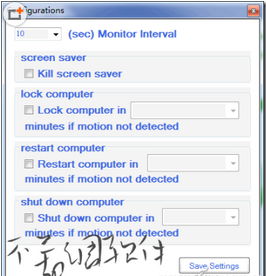
- 監控週期:X (sec) Monitor Interval(預設 10 秒,5~2560 秒可調)。
- 鎖機策略:勾選「Lock computer in X minutes if motion not detected」,設無人幾分鐘鎖定。
- 關機策略:勾選「shut down computer in X minutes if motion not detected」,設無人幾分鐘關機(如 10 分鐘)。
- 靈敏度:主視窗底部「Motion detection threshold」滑塊調整。
- 點綠色「開始」按鈕啟用 → 最小化到托盤。
場景:臨時離座忘鎖屏、下班忘關機 → 攝像頭偵測無動態 → 自動執行鎖機/關機,兼顧節能與資安。適合辦公室、共用電腦環境。