無需伺服器,本地即可完整受益於版本控制:回退錯誤、對比差異、大膽實驗。以下為最小可用命令集。
# 進入專案根目錄
git init

# 追蹤檔案(單檔/多檔/全目錄)
git add   ...
git add .          # 當前目錄所有檔

# 提交變更(附帶描述訊息)
git commit  ... -m "提交說明"
git commit -a -m "所有變更檔案的說明"
# 精簡單行輸出:hash + message
git log --pretty=oneline

# 輸出指定檔案歷史
git log --pretty=oneline --
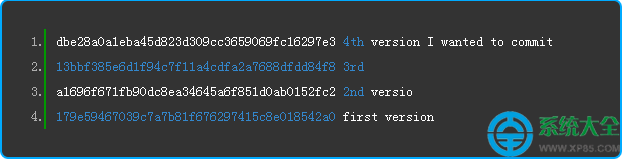
輸出範例:
dbe28a0a1eba45d823d309cc3659069fc16297e3 4th version
13bbf385e6d1f94c7f11a4cdfa2a7688dfdd84f8 3rd
a1696f671fb90dc8ea34645a6f851d0ab0152fc2 2nd
179e59467039c7a7b81f676297415c8e018542a0 first version
# 回退指定檔案到某版本(hash 前幾碼即可)
git checkout  --
# 例:git checkout 179e59467039 -- myfile

# 對比當前版本與歷史版本
git diff  --

# 對比兩個歷史版本
git diff   --
專案根目錄建立 .gitignore,內容例:
*.pyc           # Python 編譯快取
__pycache__/    # Python 3 快取目錄
讓 git status 輸出乾淨,聚焦核心代碼變更。















掌握這 10 條命令 + .gitignore,即擁有「時光機」:隨時回退、對比、釋放實驗勇氣。團隊協作、分支、遠端推拉請進階至「五分鐘教程」或官方文檔。