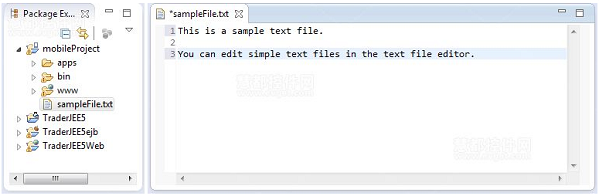
MyEclipse 內建文字編輯器支援純文字、設定檔、原始碼編輯,提供搜尋/取代、複製/剪貼/貼上、格式化、復原/重做等基礎功能。
開啟方式
- 雙擊文字檔預設以文字編輯器開啟。
- 右鍵檔案 →「Open With」→「Text Editor」。
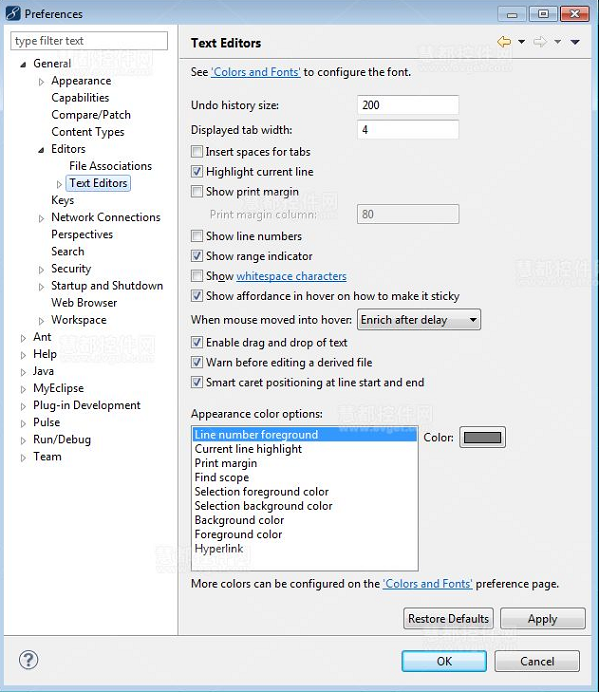
偏好設定(參數頁)存取
- 編輯器中右鍵 →「Preferences」→「Text Editor」。
- 或主選單 Window → Preferences → General → Editors → Text Editors。
常見問題:將 .txt 預設編碼改為 UTF-8
- Window → Preferences → General → Content Types。
- 選擇 Text,關聯
*.txt。
- 修改「Default encoding」為 UTF-8。
文字編輯器雖輕量,但搭配編碼設定、格式化快捷鍵,足以應付大多數非專案檔的快速編輯需求。