MyEclipse 整合圖片預覽、編輯、設計時渲染與螢幕擷圖,減少切換外部工具的摩擦。
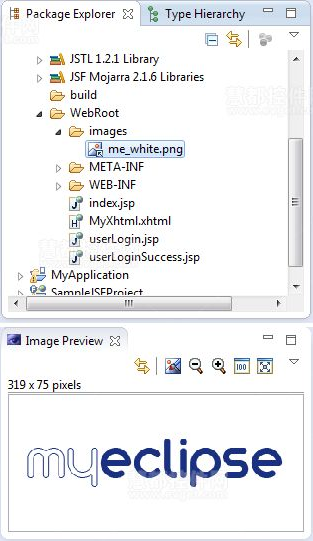
1. 快速圖片預覽(Image Preview View)
- 主選單 Window → Show View → Other → Image 開啟視圖。
- 在 Package Explorer 點選圖片檔,即時顯示縮圖,支援放大/縮小、GIF/JPG/BMP/PNG/ICO。
2. IDE 內圖片編輯器(Image Editor Perspective)
- Window → Perspective → Open Perspective → Other → MyEclipse Image Editor。
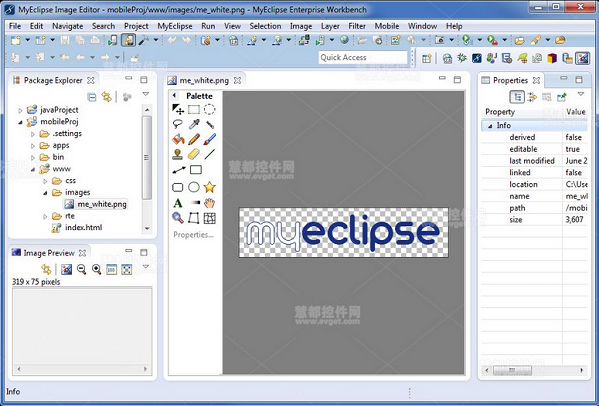
- 從專案拖曳圖片至編輯器,或使用螢幕擷圖功能自動開啟。
3. 設計時檢視 HTML 圖片
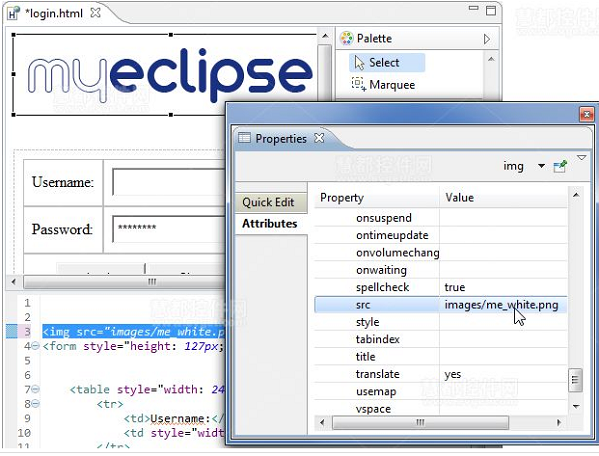
HTML 視覺化設計器的 Design 模式會渲染 src 為相對路徑的圖片。在 Properties 視圖設定 src 即可即時預覽。
4. 整合螢幕擷圖(Screen Capture)
- 支援 Vista/Win7/XP,可擷取桌面、視窗、自訂區域。
- 工具列點擊擷圖圖示,選擇儲存至剪貼板或直接在圖片編輯器開啟。
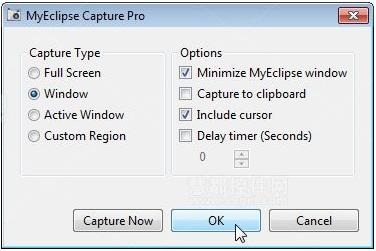
- 可選擇是否包含游標。
這套圖片工作流讓開發者在 IDE 內完成「看 → 改 → 用 → 存」閉環,特別適合 UI 密集型專案。