Windows XP Windows 7 Windows 2003 Windows Vista Windows 綜合教學 Linux 系統教學
Windows 10 Windows 8 Windows 2008 Windows NT Windows Server 電腦軟體教學
您现在的位置: Windows教程網 >> Windows教程 >  >> 電腦軟體教學 >> 電腦軟體介紹

MyEclipse 專案遷移常見問題 FAQ:元資料升級、部署組件、Runtime 缺失、Facet 版本衝突、Spring 偵測失敗

編輯:電腦軟體介紹

MyEclipse 2013 變更專案元資料格式,舊專案需經遷移嚮導轉換。遷移非破壞性、可回溯,但可能遇到以下典型問題。

遷移後必檢項目

  • Project Facets:確認技術面向版本正確(如 Java、Dynamic Web Module)。
  • Deployment Assembly:檢查部署組件路徑對應,WebSphere 專案需嚴格遵循 JEE 模組階層。

常見錯誤與解決

1. 「已配置 Target Server 但非可見 Target Runtime」

伺服器連接器未提供 Runtime 時,選擇 JEE 通用 Runtime 對應版本即可。

2. WebSphere 專案從 10.x 遷移後 Workspace Deployment 失效

遷移會保留舊封存結構,但 Workspace 模式要求嚴格 JEE 階層。需手動調整 Deployment Assembly 符合模組巢狀規則。

3. 「專案存在 Facet 约束錯誤」

通常為 Java 版本不匹配。關閉嚮導 → 專案屬性 → MyEclipse → Project Facets 修正版本或移除錯誤 Facet。
若須手動編輯:.settings/org.eclipse.wst.common.project.facet.core.xml(需在 Package Explorer 關閉 .* resources 過濾器才可見)。

4. 「無法偵測 Spring Facet 版本」

遷移需讀取 .springBeans 判斷版本。若遺失,手動建立專案根目錄下 .springBeans,內容:
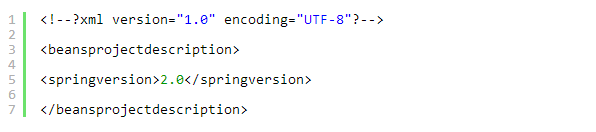
springBeans 範例內容

存檔後重新執行遷移嚮導。

提醒:.settings 資料夾預設隱藏,需在 Package Explorer「View Menu → Filters」取消勾選 .* resources。

遷移嚮導已整合舊 MyEclipse、WTP、RAD 三種來源,單一流程處理。遷移後務必驗證 Facets 與 Deployment Assembly,特別是 WebSphere 專案,以免部署階段才發現結構不符。


Copyright © Windows教程網 All Rights Reserved