Windows XP Windows 7 Windows 2003 Windows Vista Windows 綜合教學 Linux 系統教學
Windows 10 Windows 8 Windows 2008 Windows NT Windows Server 電腦軟體教學
您现在的位置: Windows教程網 >> Windows教程 >  >> 電腦軟體教學 >> 電腦軟體介紹

MyEclipse 內建 Derby 資料庫伺服器使用教學:啟動、連線、配置與 FAQ

編輯:電腦軟體介紹

前言

MyEclipse 內建 Apache Derby 嵌入式資料庫,免安裝即可體驗完整資料庫開發流程,附帶範例資料庫 myeclipse(含 CLASSICCARS、MYBLOG 兩個 Schema),極適合教學與原型開發。
核心操作

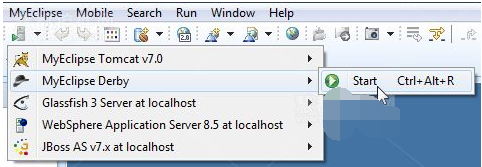
▶️ 啟動/停止 Derby 服務

  • 工具列下拉選單 → MyEclipse Derby → Start/Stop
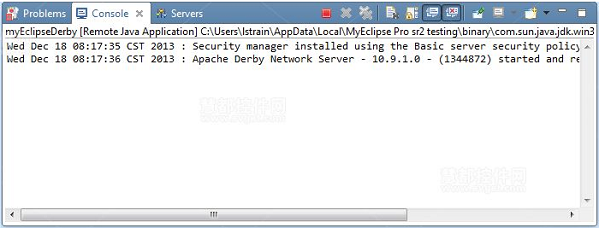
  • Console 視圖顯示狀態訊息確認
  • 亦可在 Servers 視圖控制

啟動Derby服務

Derby啟動狀態

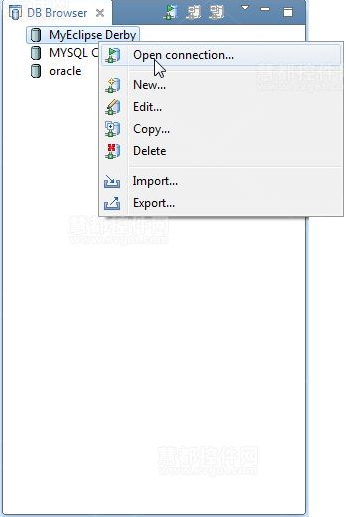
🔗 DB Browser 連線 Derby

  1. 切換至 MyEclipse Database Explorer 視角
  2. 確認 Derby 服務已啟動
  3. DB Browser 右鍵 MyEclipse Derby 驅動 → Open Connection

連接Derby資料庫

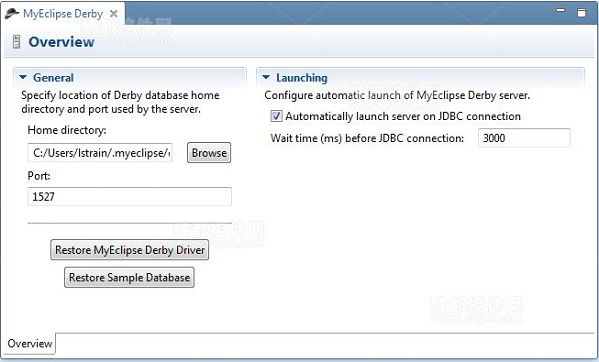
⚙️ 配置嵌入式 Derby 服務

雙擊 Servers 視圖中的 MyEclipse Derby 開啟配置頁:

  • Home Directory:資料庫檔案儲存路徑(預設 /.myeclipse/derby)
  • Port:網路監聽埠(預設 1527)
  • Restore Derby Driver:重置驅動配置/重建驅動
  • Restore Sample Database:重建範例資料庫(需先停止服務)
  • Auto-start:JDBC 連線時自動啟動服務

Derby配置頁面

常見問題 FAQ

問題答案
Eclipse 會話中修改是否持久化?是,寫入 Home Directory 磁碟
多 MyEclipse 實例能共用資料庫?可,但避免同時啟動多個 Derby 服務導致損壞
用戶名意義?視為預設 Schema,預設 classiccars 對應 CLASSICCARS
密碼要求?任意非空字串

總結

Derby 為 MyEclipse 使用者提供零配置的資料庫環境,配合範例資料與完整工具鏈,是學習 JPA/Hibernate/Spring Data 的最佳練兵場。

Copyright © Windows教程網 All Rights Reserved