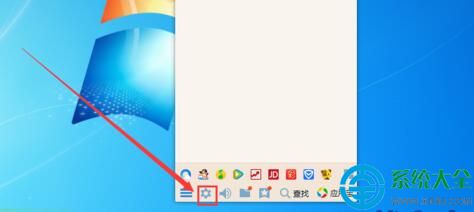
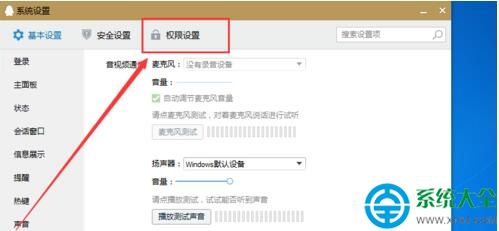
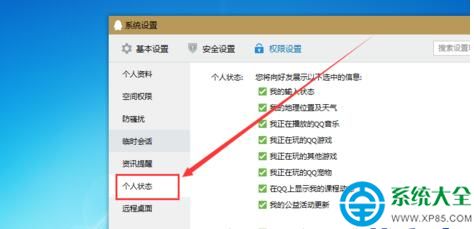
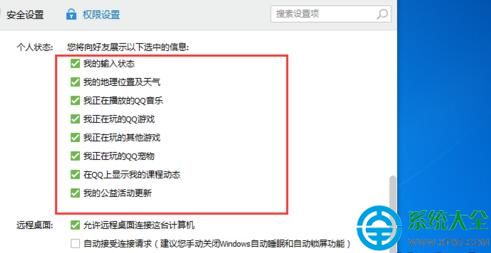
想讓 QQ 好友看到你正在聽的歌?設置極簡單:
音樂品味,無聲傳遞給懂你的人。
IE11 無法安裝支付寶/網銀控件?三步修復兼容性問題
人生日曆「今日概覽」自訂教學:打造專屬你的每日儀表板
三星 Galaxy S4 (i959) 刷機救磚完整教程:Odin 線刷官方包
USB 寶盒修改 Windows 7 密碼教學:製作啟動盤、離線清除/重設密碼、多功能實用
插上隨身碟自動加密備份:Abelssoft Backup 讓重灌系統前不再怕遺漏重要檔
老筆電煥新七大招:mSATA SSD、USB 3.0、高清解碼卡、無線網卡、天線……按需升級延續戰力
無密碼也能保 WiFi 安全:MAC 白名單 + 管理界面 MAC 綁定,拒絕蹭網無需記複雜密碼
電腦無法複製貼上怎麼辦?從重開機到進階修復全攻略