檔案明明在電腦裡,Windows 搜尋卻顯示「沒有符合項目」,主因是索引資料庫損壞或未包含該磁碟。重建索引即可解決:
重建索引步驟
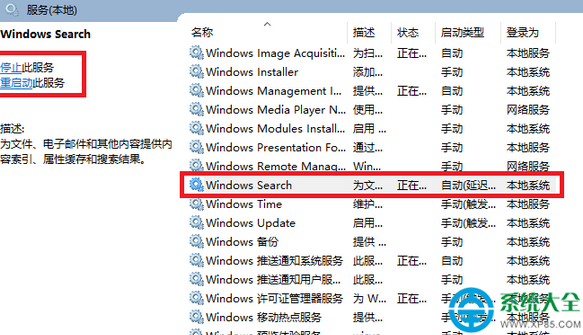
- 開啟 控制台 → 系統及安全性 → 管理工具 → 服務,找到 Windows Search,雙擊將啟動類型設為 自動 並啟動服務。
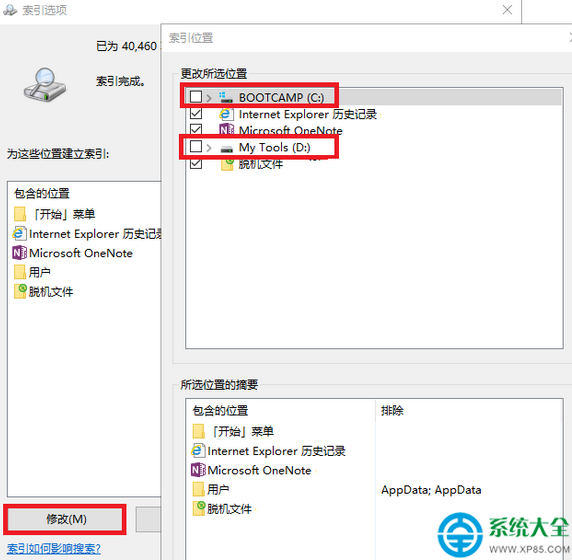
- 回到控制台 → 索引選項,點擊 【修改】,取消所有磁碟勾選 → 確定 → 再次進入 【修改】 重新勾選所有欲建立索引的磁碟 → 確定。
- 在「索引選項」視窗點擊 【進階】 → 【索引設定】 索引標籤 → 按 【重建】。系統開始重建索引(磁碟指示燈會頻繁閃爍),完成後搜尋功能恢復正常。
進階技巧
- 「進階」→「檔案類型」可新增/移除欲索引的副檔名(如 .md、.log)。
- 「進階」→「索引位置」可將索引資料庫移至非系統碟,減輕 C 槽負擔。
- 需更強大即時搜尋,建議安裝 Everything(voidtools)等第三方工具。