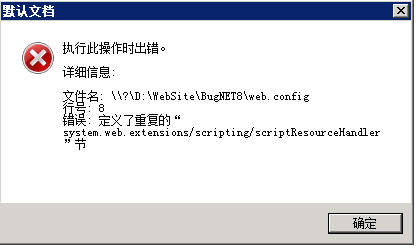
在 Windows Server 2008 + IIS 7 環境部署 ASP.NET Web Service 時,瀏覽器顯示 HTTP 500 錯誤,詳細訊息指出 web.config 中重複定義了 system.web.extensions/scripting/scriptResourceHandler 區段。
.NET Framework 4.0 的機器層級設定檔 machine.config (路徑通常為 C:\Windows\Microsoft.NET\Framework64\v4.0.30319\Config\machine.config) 已預先註冊了 AJAX 相關處理常式。專案本身的 web.config 若再次宣告相同區段,便會衝突。
於專案 web.config 的 <system.webServer> 或 <system.web> 區塊中,使用 <remove> 移除衝突的處理常式與模組註冊:
<system.webServer>
  <handlers>
    <remove name="ScriptResourceHandler" />
    <!-- 其他可能重複的 handlers -->
  </handlers>
  <modules>
    <remove name="ScriptModule" />
    <!-- 其他可能重複的 modules -->
  </modules>
</system.webServer>
</system.webServer> 等標籤。<configSections> 中清除重複區段定義,但通常移除 handlers/modules 即可。