Qt 在 Ubuntu 桌面環境可正常顯示中文,但交叉編譯至嵌入式開發板時常出現方塊字或亂碼。核心原因有二:字元編碼設定與目標板缺少中文字型。
/usr/share/fonts/truetype/wqy/ 複製 wqy-microhei.ttc 等字型至開發板 Qt 字型目錄(如 /opt/qt-4.8.4/lib/fonts/)。export QT_QWS_FONTDIR=/opt/qt-4.8.4/lib/fonts#include <QApplication>
#include <QTextCodec>
#include <QFont>
int main(int argc, char *argv[])
{
QApplication a(argc, argv);
QTextCodec *codec = QTextCodec::codecForName("utf8");
QTextCodec::setCodecForLocale(codec);
QTextCodec::setCodecForCStrings(codec);
QTextCodec::setCodecForTr(codec);
QFont font;
font.setFamily("wqy-microhei");
a.setFont(font);
// 介面字串使用 tr() 宏
// ui->label->setText(tr("攝像頭已經運行!"));
return a.exec();
}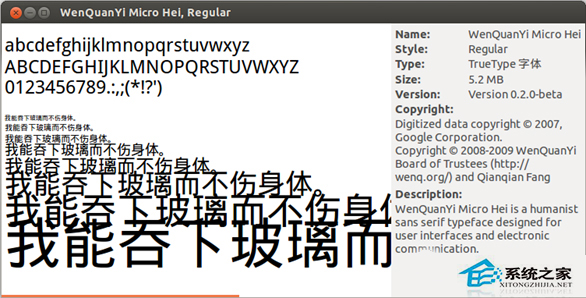
完成上述步驟後,開發板上即可正常渲染中文,字型大小、換行排版皆無異常。
Linux VirtualBox 安裝 Windows 8.1 報錯 0x000000C4 解決:啟用 CMPXCHG16B CPU 指令支援
Linux 關機與重啟指令全解析:shutdown、halt、reboot、systemctl、init 正確姿勢
Valgrind 偵測 C 程式七大記憶體錯誤:洩漏、越界、雙重釋放、野指標實戰代碼
Linux dmidecode 指令詳解:跨機房查詢硬體資訊(CPU、記憶體、主機板、BIOS)
Linux uniq 指令完全攻略:去除重複行、統計頻率與進階欄位過濾
Ubuntu 自訂鍵盤快捷鍵啟動應用程式:以 Eclipse 為例