dmidecode 解讀 SMBIOS/DMI 資料庫,以文字輸出硬體資訊,讓管理員無需進機房即可查詢伺服器型號、序號、記憶體規格等關鍵資料。
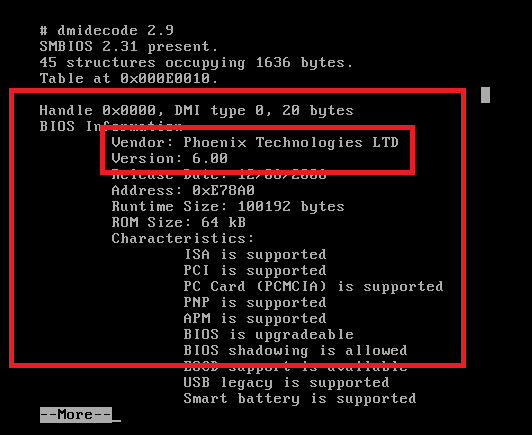
dmidecode 將 DMI 資料庫解碼為可讀文本,但資訊可被人為修改,不保證 100% 準確。Handle 0x0002, DMI type 2, 8 bytes
Base Board Information
Manufacturer: Intel
Product Name: C440GX+
Version: 727281-0001
Serial Number: INCY92700942# Debian/Ubuntu
apt-get install dmidecode
# 原始碼編譯
wget https://download.savannah.gnu.org/releases/dmidecode/dmidecode-3.x.tar.xz
tar xf dmidecode-3.x.tar.xz && cd dmidecode-3.x && make && make install
# Windows 版
https://gnuwin32.sourceforge.net/packages/dmidecode.htm| 需求 | 指令 |
|---|---|
| CPU 資訊 | dmidecode -t processor |
| 記憶體插槽與規格 | dmidecode -t memory |
| 主機板資訊 | dmidecode -t baseboard |
| BIOS 版本 | dmidecode -t bios |
| 機箱資訊 | dmidecode -t chassis |
善用 dmidecode 可大幅降低硬體資產盤點成本。
Linux 使用 rm -rf 徹底刪除檔案與目錄參數詳解與注意事項
Linux ZoneMinder 視頻監控系統部署全流程:LAMP 環境到攝像頭接入
Linux Crontab 定時任務 Shell 腳本不執行?環境變數缺失排查與修正
Shell 文字處理十大神器:find、grep、xargs、sort、uniq、tr、cut、paste、wc、sed、awk 核心用法速查
RHEL 5 使用 Autofs 自動掛載 /dev/sdb 至 /data/abc:配置 auto.master 與 auto.mytest 實現按需掛載
Linux 終端機播放 SoundCloud:安裝與使用 soundcloud2000