掌握 MariaDB 版本資訊對漏洞修補、相容性驗證、升級規劃至關重要。本文提供三種查詢方式:登入客戶端自動顯示、SQL status / SELECT VERSION()、套件管理器查詢安裝套件版本 (rpm/dpkg/apt)。

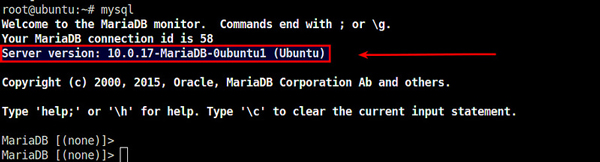
$ mysql -u root -p
Welcome to the MariaDB monitor.  Commands end with ; or \g.
Your MariaDB connection id is 123
Server version: 10.5.23-MariaDB-0ubuntu0.22.04.1 (Ubuntu)
...
# 登入後
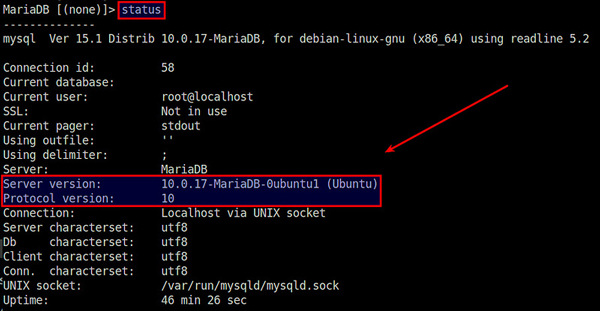
MariaDB [(none)]> status;
--------------
mysql  Ver 15.1 Distrib 10.5.23-MariaDB, for debian-linux-gnu (x86_64) using readline 5.2
Connection id: 123
Server version: 10.5.23-MariaDB-0ubuntu0.22.04.1 (Ubuntu)
Protocol version: 10
Connection: Localhost via UNIX socket
...

# 或純 SQL
MariaDB [(none)]> SELECT VERSION();
+----------------------------------+
| VERSION()                        |
+----------------------------------+
| 10.5.23-MariaDB-0ubuntu0.22.04.1 |
+----------------------------------+
# RHEL/CentOS/Fedora
rpm -qa | grep -i mariadb
# mariadb-server-10.5.23-1.el9.x86_64
# mariadb-10.5.23-1.el9.x86_64

# Debian/Ubuntu
dpkg -l | grep mariadb
# ii  mariadb-server-10.5    1:10.5.23-0ubuntu0.22.04.1

# 查詢可用升級版本
apt list --upgradable | grep mariadb
dnf check-update mariadb
10.5.23:上游 MariaDB 版本 (Major.Minor.Patch)。-0ubuntu0.22.04.1:下游發行版打包修訂號 (Ubuntu 22.04 第 1 次修訂)。三種方法互補,確保在任何環境 (有/無資料庫存取權、有/無 Shell) 都能快速獲取版本資訊。
Linux Docker 容器實戰入門:從鏡像拉取到網絡互通完整演示
Linux 安裝 Python 第三方庫報錯「Python version 2.7 required」?註冊表修復腳本解決
Ubuntu 12.04 搭建 Ruby on Rails 開發環境完整教學(RVM + Ruby 2.0 + Rails 3.2 + MySQL)
Linux 禁止特定 IP 存取:hosts.allow / hosts.deny 與 tcpd 實戰配置
Ubuntu 安裝 qBittorrent:穩定版與開發版 PPA 選擇指南