Windows XP Windows 7 Windows 2003 Windows Vista Windows 綜合教學 Linux 系統教學
Windows 10 Windows 8 Windows 2008 Windows NT Windows Server 電腦軟體教學

自訂 Windows XP 自動播放視窗 讓隨身碟光碟操作更高效

編輯:XP 系統基礎知識

自訂 Windows XP 自動播放視窗 讓隨身碟光碟操作更高效

插入光碟、隨身碟或行動儲存裝置時,XP 會彈出「自動播放」視窗供選擇後續動作。雖方便,但缺乏自訂功能,無法移除不需選項或加入常用程式。小工具 Autoplay Repair 完美解決此痛點。

預覽與移除現有命令

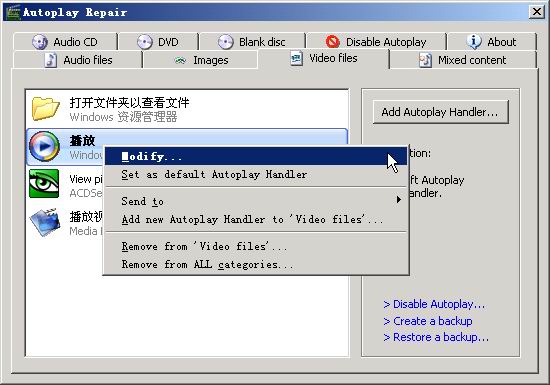
依儲存媒體與檔案類型,系統預設不同應對方案。Autoplay Repair 介面分頁顯示各類方案(圖 2)。欲移除命令(如「使用 Windows Media Player 播放」),進入對應分頁(如「Video files」),右鍵點擊該命令選「Remove from 'Video files'」;若該命令存在多個分類,選「Remove from ALL categories」可一次全刪。
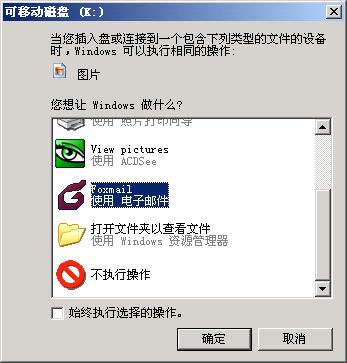
自動播放視窗預設樣貌
Autoplay Repair 介面分頁
移除命令示意

新增自訂命令

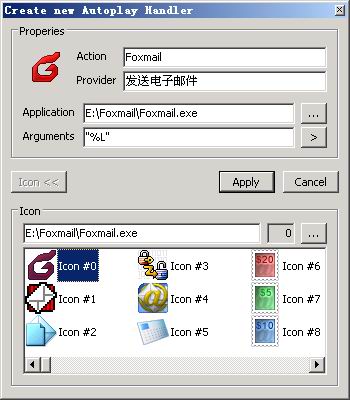
例:在圖片檔自動播放視窗加入 Foxmail。進入「Images」分頁點「Add Autoplay Handler」:

  • Action:輸入命令名稱(如「用 Foxmail 開啟」)
  • Provider:輸入說明文字
  • Application:點「...」選擇 Foxmail 主程式路徑
  • Arguments:執行參數(無則保留預設)
  • Icon:選擇圖示
  • 點「Apply」完成

停用特定磁碟機自動播放

開啟「Disable Autoplay」分頁,取消該磁碟機前的核取方塊,點「Apply」即可停用該磁碟機的自動播放功能。

下載連結:Autoplay Repair(由印表機維修網推薦)

Copyright © Windows教程網 All Rights Reserved