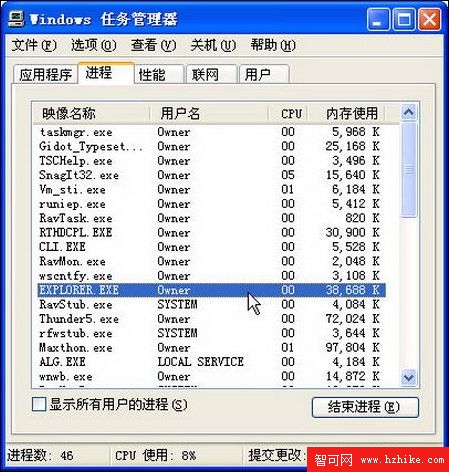
刪除檔案或資料夾時常遇到「檔案正被另一個人或程式使用」提示,明明已關閉相關程式仍無法刪除。原因通常是 explorer.exe(檔案總管進程)仍持有檔案控制代碼。透過工作管理員重啟總管進程即可釋放鎖定。
explorer.exe
Explorer.exe
原理:檔案總管負責 Shell 命名空間與檔案關聯,重啟進程會釋放所有持有的檔案控制代碼。此法適用於大多數非系統核心檔案的鎖定情況。
Windows XP 內建工具與技巧:徹底移除流氓軟體與 IE 外掛
清除遠端桌面連線紀錄:保護 IP 與網域隱私
Windows 變慢原因大解析:軟體、硬體、病毒三面向 + 11 招加速技巧
Windows XP 服務優化完整指南:逐項分析與建議設定
關閉 Windows XP 光碟自動播放:登錄法、群組原理與第三方工具三法合一
深度解析 64 位元 Windows XP Professional x64 Edition
Windows XP 快速鍵大全:從 Win 鍵到對話框操作的完整速查表
Windows XP SP2 如何重塑 IE 安全體驗:彈出視窗攔截、增益集管理與區域鎖定全解析