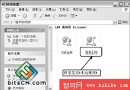
區域連線內容 → 進階分頁,防火牆 (ICF) 不見,提示「Windows 無法顯示此連線的內容,WMI 資訊可能損毀」。關閉系統還原無法用還原點救援,實測修復步驟:
C:\Windows\System32\Wbem\Repository
此故障因 Repository 檔案損壞,WMI 每 30-60 秒讀取一次導致錯誤。連帶症狀:無法檢視區域連線內容、msinfo32 無回應、wmimgmt.msc 提示 WMI Generic failure。
Windows XP 安裝光碟隱藏的支援工具:安全管理利器大公開
Windows XP 批次腳本掃描 DHCP 範圍內未使用 IP:IPTracker.bat 一鍵輸出記事本
Windows XP 音量雖調至最大仍聲音太小?完整音訊設定調大音量教學
網遊帳號安全防護:防火牆阻斷盜號木馬外連傳輸
讓 NetBEUI 協定在 Windows XP 重現:從安裝光碟還原協定檔案
解決 Windows XP 開機緩慢的完整調校指南
Windows XP 進階應用技巧大全(下篇)
關閉 Windows XP 搜尋 ZIP 檔案內容,大幅加快搜尋速度