Windows XP Windows 7 Windows 2003 Windows Vista Windows 綜合教學 Linux 系統教學
Windows 10 Windows 8 Windows 2008 Windows NT Windows Server 電腦軟體教學

解決「找不到 msconfig.exe」無法開啟系統設定工具

編輯:XP 常見問題解答

現象

執行 msconfig 提示「找不到檔案」,無法開啟系統設定公用程式。

原因

登錄 HKEY_LOCAL_MACHINE\SOFTWARE\Microsoft\Windows\CurrentVersion\App Paths 缺少 msconfig.exe 路徑導向,或檔案遺失/路徑變更。

解決方法

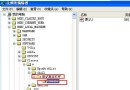
  1. Win + R → regedit → 定位至上述機碼。
  2. 右鍵空白處 → 新增 → 項目 → 命名 MSCONFIG.EXE。
  3. 選中該項目,右側雙擊「預設」字串值,數值資料設為:
    C:\Windows\PCHealth\HelpCtr\Binaries\MSConfig.exe (依實際系統盤調整)。
  4. 關閉登錄編輯器,再次執行 msconfig 即可開啟。

替代方案

  • Windows 2000 使用者可從 XP C:\Windows\PCHEALTH\HELPCTR\Binaries 複製 Msconfig.exe 至系統目錄使用。


  • 若嫌麻煩,可嘗試修復安裝或重新覆蓋安裝 XP。
Copyright © Windows教程網 All Rights Reserved