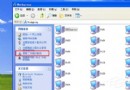
「開始 → 所有程式 → 附屬應用程式 → 系統工具 → 系統資訊」→ 左側展開「元件 → 網路 → 配接器」,即可看到 MAC 位址。
cmd
ipconfig /all
補充:ipconfig /release 釋放 IP、ipconfig /renew 重新取得 IP。
ipconfig /release
ipconfig /renew
CPU 選購防騙全攻略:5 招鑑別原裝盒與散片,拒絕被當韭菜
解決 Vista 啟動管理器 (bootmgr) 遺失/損壞:啟動修復自動修復
Windows XP 開機誤報「有未讀郵件」?Outlook Express/郵件帳戶設定檢查與關閉教學
Windows XP SP3 常見問題解答:最後的服務包整合百餘修補程式
忘記XP登入密碼?兩大破解攻略輕鬆找回
Windows XP 提示「QQprotect.exe 損壞,請執行 Chkdsk」修復教學
Windows XP 螢幕重新整理率設定教學:CRT 螢幕最佳值 85Hz,LCD 固定 60Hz
WinXP 找不到 IIS (Internet Information Services)?手動安裝修復教學