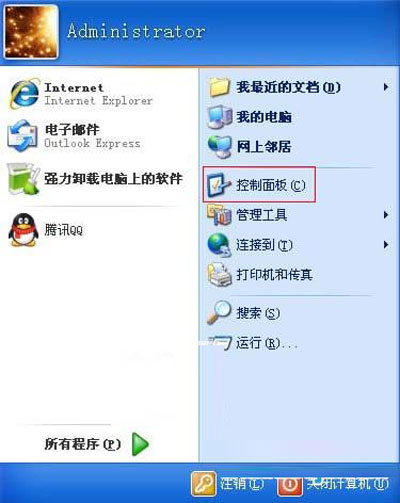
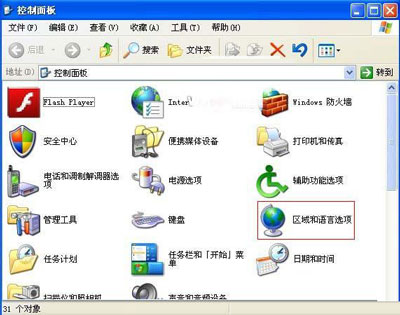
工作列右下角輸入法指示器(語言列)不見了?雖 Ctrl+Shift/Alt+Shift 仍可切換,但無視覺回饋極不便。控制台「地區與語言選項」4 步驟找回。
reg add "HKCU\Software\Microsoft\Windows\CurrentVersion\Run" /v "CTFMON.EXE" /t REG_SZ /d "C:\WINDOWS\system32\ctfmon.exe" /f重新登入生效。ctfmon.exe 是輸入法/語言列核心程序。
ctfmon.exe 被誤刪/誤停用(msconfig → 啟動項取消勾選)。HKCU\Software\Microsoft\Windows\CurrentVersion\Run 缺少 ctfmon.exe 啟動項。語言列消失是高頻小故障,4 步驟 30 秒搞定。建議將 ctfmon.exe 加入啟動項備份,未來一鍵恢復。
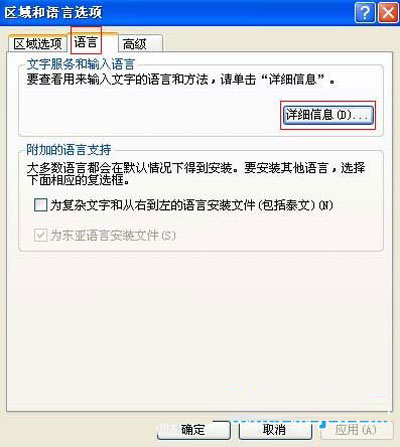
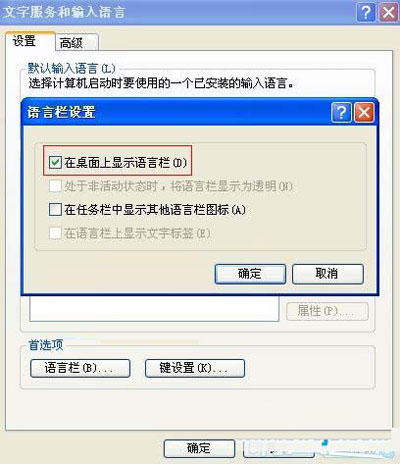
WinXP 開機提示「系統資源不夠 無法完成 API」導致重啟循環的解決方案
Windows XP 自動彈出網頁/定時彈窗怎麼辦?註冊表清理開機彈窗、msconfig 關閉 HTA、工作管理員強制結束 IE 進程
Windows 防毒軟體五大共同原則:安裝時機、即時掃描與避免雙軟衝突
USB 裝置「無法停止通用磁碟區」解決方案:關閉媒體預覽功能
WinXP 本地 Localhost 無法開啟?IIS 安裝與匿名存取完整配置指南
Windows XP 行動硬碟插上不顯示/無磁碟機代號?磁碟管理分區、sptd.sys 衝突、供電不足全方位排查指南