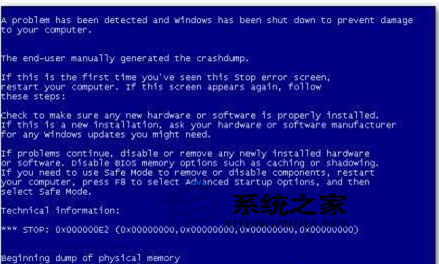
360 修補漏洞安裝補丁後重開機藍畫面,主因特定補丁(如 KB2838727)與硬體/驅動衝突。兩大救援管道:
Windows
$NtUninstallKBxxxxxx$
spuninst
spuninst.exe
PE 卸載法為終極大招,不進系統也能精準移除致災補丁,建議收藏備用。
WinXP聲音與音訊裝置完整設定入門
Windows「延遲寫入失敗」常見成因與排查指南
WinXP 硬碟圖示變了怎麼改回來?五大原因與完整修復方案
你不知道的 Windows XP 9 大隱藏秘技:ClearType、systeminfo、命令參數、GPEdit、鎖機捷徑、顯示隱藏元件、ZIP 資料夾、IPv6、任務結束
WinXP 取消開機登入畫面實現自動登入?控制台用戶帳戶或 rundll32 netplwiz.dll 兩種方法
Windows XP 滑鼠單點變雙點?調整採樣率一招修復
XP搜尋隱藏檔案兩大法:介面設定與登錄檔修改雙管齊下
Windows XP 隱藏「最近使用文件」紀錄,保護隱私不留痕跡