Windows XP Windows 7 Windows 2003 Windows Vista Windows 綜合教學 Linux 系統教學
Windows 10 Windows 8 Windows 2008 Windows NT Windows Server 電腦軟體教學

WinXP建立一鍵鎖定/休眠捷徑:rundll32指令詳解

編輯:XP 系統應用技巧

臨時離開需快速鎖定/休眠,建立桌面捷徑呼叫系統核心函式。

建立鎖定捷徑

  1. 桌面右鍵→「新增」→「捷徑」。
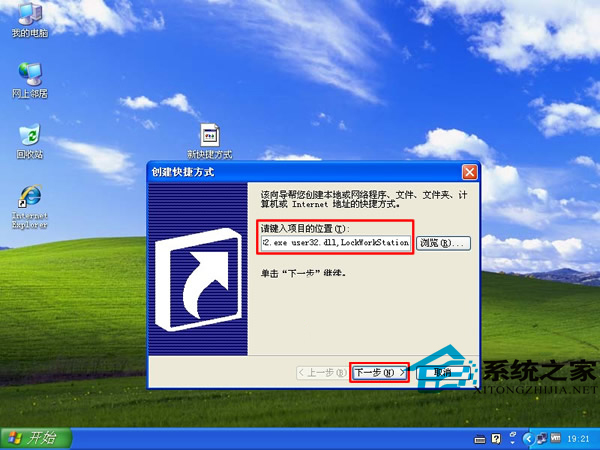
  2. 位置輸入:%windir%\System32\rundll32.exe user32.dll,LockWorkStation(逗號為半形)。
  3. 命名「鎖定電腦」→完成。雙擊即鎖定。

建立休眠捷徑(擴充)

位置改輸入:C:\WINDOWS\system32\rundll32.exe powrprof.dll,SetSuspendState,命名「休眠」。
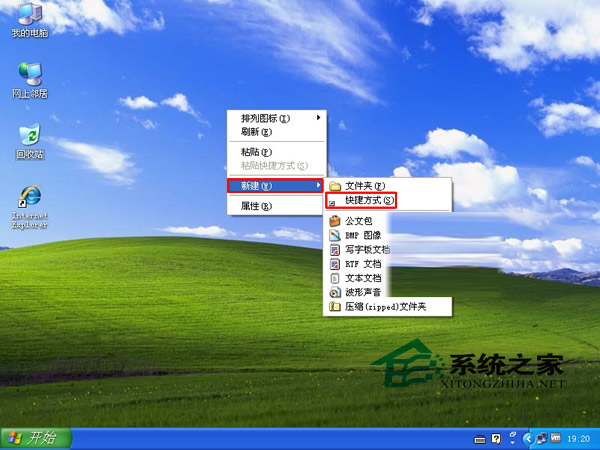
新增捷徑對話框

輸入rundll32指令

原理:rundll32載入系統DLL並呼叫匯出函式,user32.dll!LockWorkStation鎖定工作站,powrprof.dll!SetSuspendState進入休眠,無需第三方工具。

Copyright © Windows教程網 All Rights Reserved