Windows XP Windows 7 Windows 2003 Windows Vista Windows 綜合教學 Linux 系統教學
Windows 10 Windows 8 Windows 2008 Windows NT Windows Server 電腦軟體教學

WinXP修改註冊表遷移IE收藏夾至非系統盤

編輯:XP 系統應用技巧

IE收藏夾預設在C盤,重裝系統易遺失。透過註冊表修改路徑可永久遷移至資料盤,重裝後不丟失。

遷移步驟

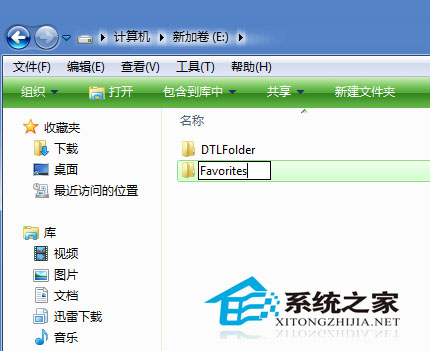
  1. 在非系統盤(如D:)新建Favorites資料夾,將C:\Documents and Settings\用戶名\Favorites內容完整複製過去。
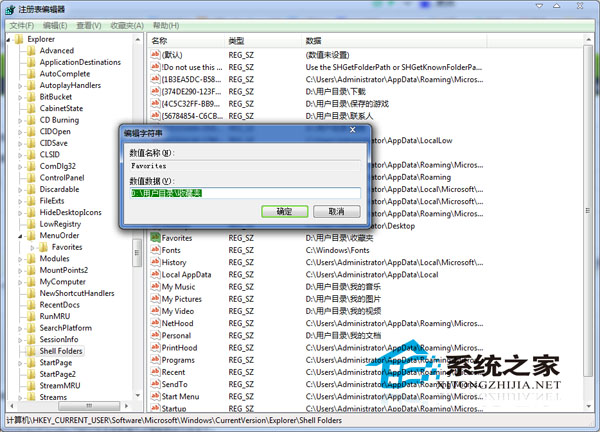
  2. Win+R→regedit→定位至:
    HKEY_CURRENT_USER\Software\Microsoft\Windows\CurrentVersion\Explorer\User Shell Folders
  3. 右側找到Favorites字串值→右鍵「修改」→數值資料改為新路徑(如D:\Favorites)→確定。
  4. 關閉所有IE視窗,重啟電腦(或註銷重登入)即生效。

新建Favorites資料夾

註冊表修改Favorites路徑

延伸應用:同一分支下的Personal(我的文件)、Desktop(桌面)等同樣可修改路徑。修改註冊表後必須重啟才會生效。

Copyright © Windows教程網 All Rights Reserved