Windows XP Windows 7 Windows 2003 Windows Vista Windows 綜合教學 Linux 系統教學
Windows 10 Windows 8 Windows 2008 Windows NT Windows Server 電腦軟體教學

WinXP 手動重建遺失的 boot.ini 開機設定檔?記事本編輯存檔即可

編輯:XP 系統應用技巧

boot.ini 遺失會導致無法開機。可用記事本建立標準內容存為 C:\boot.ini 修復。

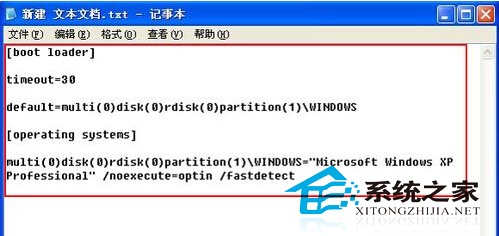
標準 boot.ini 內容範例

[boot loader]
timeout=30
default=multi(0)disk(0)rdisk(0)partition(1)\WINDOWS
[operating systems]
multi(0)disk(0)rdisk(0)partition(1)\WINDOWS="Microsoft Windows XP Professional" /noexecute=optin /fastdetect

建立步驟

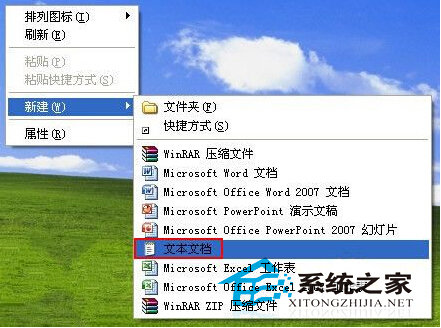
  1. 開啟記事本,貼上上述內容(依實際分割區調整 partition(N))。
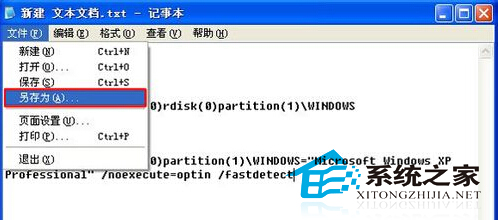
  2. 「另存新檔」→ 檔名 boot.ini → 儲存至 C:\ 根目錄。
  3. 設定檔案屬性為「系統」、「隱藏」、「唯讀」。

記事本編輯 boot.ini
boot.ini 內容範例
另存為 boot.ini

若為多重開機,需在 [operating systems] 區段加入其他系統啟動項。修改前建議備份原檔(若存在)。

Copyright © Windows教程網 All Rights Reserved