Windows XP Windows 7 Windows 2003 Windows Vista Windows 綜合教學 Linux 系統教學
Windows 10 Windows 8 Windows 2008 Windows NT Windows Server 電腦軟體教學

Windows 下 Firefox 2 與 Firefox 3 共存設定教學 (2/2)

編輯:Windows XP 系統介紹

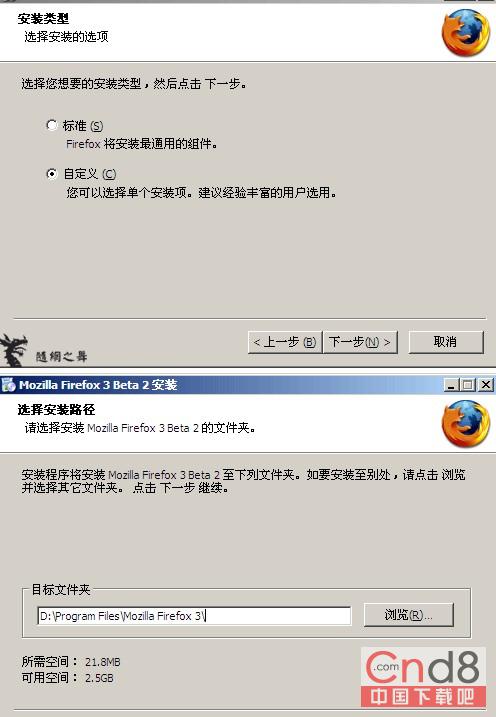
安裝 Firefox 3 至自訂路徑

  1. 安裝類型選「自訂」,指定獨立安裝資料夾(如 C:\Program Files\Mozilla Firefox 3),避免覆蓋 Firefox 2。
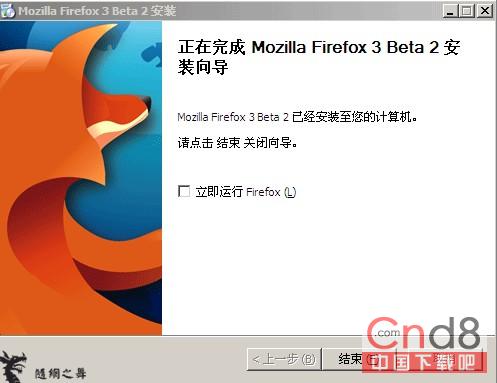
  2. 安裝完成勿勾選「立即啟動 Firefox」,預設會使用 default 設定檔。

自訂安裝路徑 安裝完成不啟動

建立 Firefox 3 專用捷徑

  1. 右鍵 Firefox 3 捷徑→「內容」→「目標」欄位在 .exe" 後加入 -no-remote -p firefox3,指定使用剛建立的 Firefox3 設定檔。
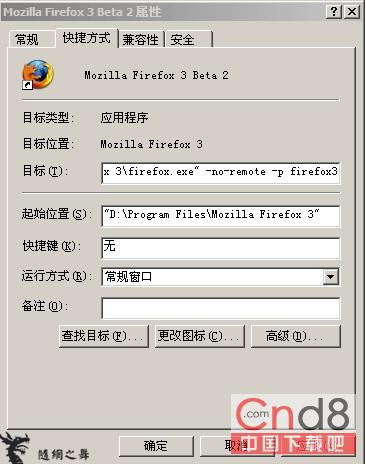
Firefox 3 捷徑參數

完成與補充

現在可同時執行 Firefox 2(預設設定檔)與 Firefox 3(Firefox3 設定檔)。
遺憾:Firefox 3 初期不相容 Firefox 2 擴充套件(含 Firebug),幸運的是 Firebug 1.1 Beta 已支援 Firefox 3。
替代方案:MultiFirefox (Python 跨平台工具) 亦可管理多版本共存。

Copyright © Windows教程網 All Rights Reserved