Windows XP Windows 7 Windows 2003 Windows Vista Windows 綜合教學 Linux 系統教學
Windows 10 Windows 8 Windows 2008 Windows NT Windows Server 電腦軟體教學

Windows 下 Firefox 2 與 Firefox 3 共存設定教學 (1/2)

編輯:Windows XP 系統介紹

Firefox 3 採用 Gecko 1.9 引擎,效能、穩定性、安全性大幅提升。網頁開發者需同時測試兩版本,以下教學實現 Windows 下雙版本共存並可同時執行。

核心概念:獨立設定檔 + -no-remote 參數

  1. 下載 Firefox 3 (Beta 2 或更新版本)。
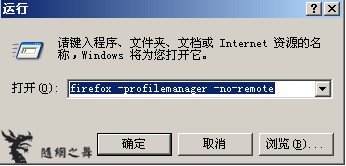
  2. 執行 firefox -profilemanager -no-remote 開啟設定檔管理員(-no-remote 允許瀏覽器執行中開啟管理員)。
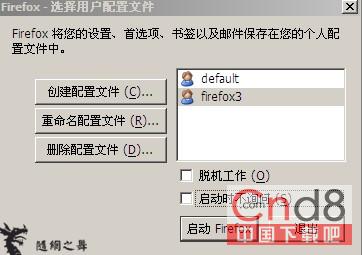
  3. 點「建立設定檔」命名為 Firefox3,取消勾選「啟動時不詢問」。

設定檔管理員 建立 Firefox3 設定檔

修改 Firefox 2 捷徑

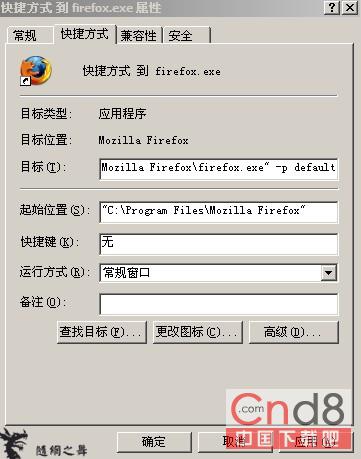
  1. 右鍵 Firefox 2 捷徑→「內容」→「目標」欄位,在 .exe" 後加入 -p default,指定使用預設設定檔。

Firefox 2 捷徑修改

下集將說明 Firefox 3 安裝路徑選擇與捷徑參數設定。

Copyright © Windows教程網 All Rights Reserved