Sfc.exe (System File Checker) 是 Windows 內建工具,用於驗證系統檔案完整性並修復損壞檔案。XP 版功能更強,可掃描所有受保護系統檔案、設定快取大小、清除/重填 %SystemRoot%\System32\Dllcache。
cmd 或「開始→所有程式→附件→命令提示字元」。sfc 列出參數說明。sfc /scannow:立即掃描所有受保護系統檔案,發現錯誤提示插入 XP 安裝光碟修復。sfc /scanonce:下次重開機掃描一次。sfc /scanboot:每次開機掃描。sfc /cachesize=xxx:設定檔案快取大小 (MB)。sfc /purgecache:清除快取並重新填充。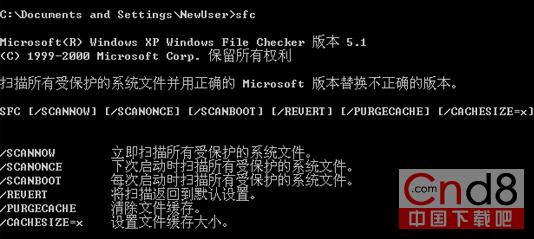
若 Dllcache 資料夾損壞,使用
/scanonce或/scanboot可修復其內容,確保系統穩定。