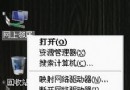
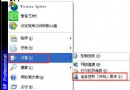
右鍵「我的電腦」選單中缺少「管理」選項,無法快速開啟「電腦管理」 (compmgmt.msc)。
登錄檔 HKEY_CLASSES_ROOT\CLSID\{20D04FE0-3AEA-1069-A2D8-08002B30309D}\shell\Manage\command 鍵值遺失或損毀。
Windows Registry Editor Version 5.00

[HKEY_CLASSES_ROOT\CLSID\{20D04FE0-3AEA-1069-A2D8-08002B30309D}\shell\Manage\command]
@=hex(2):6d,00,6d,00,63,00,2e,00,65,00,78,00,65,00,20,00,63,00,6f,00,6d,00,70,\
00,6d,00,67,00,6d,00,74,00,2e,00,6d,00,73,00,63,00,00,00
fix_my_computer_manage.reg (編碼選 Unicode/UTF-16 LE 最保險)。mmc.exe compmgmt.msc — 即「管理」選項應執行的命令。
compmgmt.msccompmgmt.msc