開機時藍屏顯示 autochk.exe program not found, skipping autocheck,屬於自動磁碟檢查程式遺失或登錄設定錯誤。三種修復方案由輕至重徹底解決。
regedit 開啟登錄編輯器。HKEY_LOCAL_MACHINE\SYSTEM\CurrentControlSet\Control\Session Managerautocheck autochk *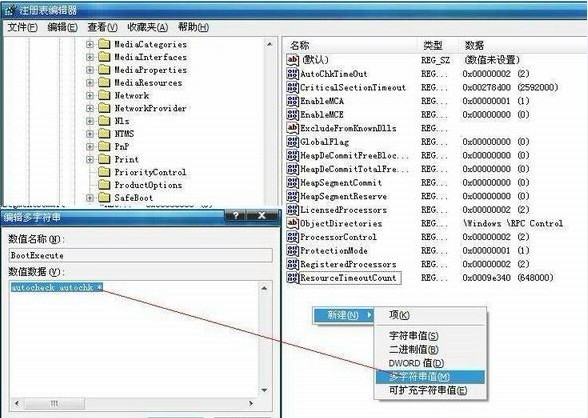
C:\Windows\System32\autochk.exe 遺失,從 XP 安裝光碟 I386 目錄找到 autochk.ex_。C:\Windows\System32\(可用 expand 指令)。autochk 在開機前完整掃描修復。方案一解決 90% 以上案例。若仍失敗,依序嘗試方案二、三。修復後藍屏訊息消失,開機流程恢復正常。