Windows XP Windows 7 Windows 2003 Windows Vista Windows 綜合教學 Linux 系統教學
Windows 10 Windows 8 Windows 2008 Windows NT Windows Server 電腦軟體教學

XP 快捷方式小箭頭去除術:註冊表刪除 IsShortcut 值,桌面瞬間乾淨

編輯:Windows XP 系統介紹

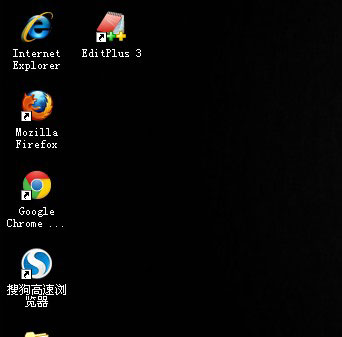
桌面捷徑左下角的小箭頭雖能辨識捷徑,但許多人覺得影響美觀。修改註冊表刪除兩個 IsShortcut 值,即可徹底隱藏小箭頭,無需第三方工具。

操作步驟

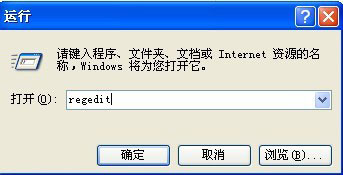
  1. Win+R → regedit。
    執行regedit
  2. 定位 HKEY_CLASSES_ROOT\lnkfile → 右側找 IsShortcut → 右鍵 刪除。
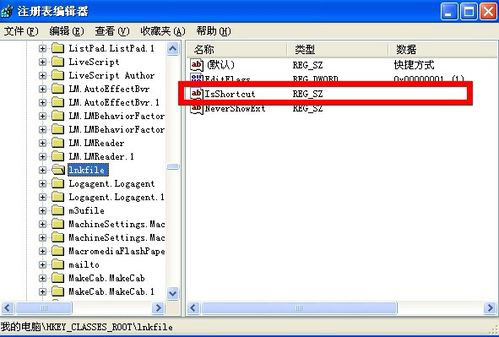
    lnkfile IsShortcut 刪除IsShortcut
  3. 定位 HKEY_CLASSES_ROOT\piffile → 同樣刪除 IsShortcut。
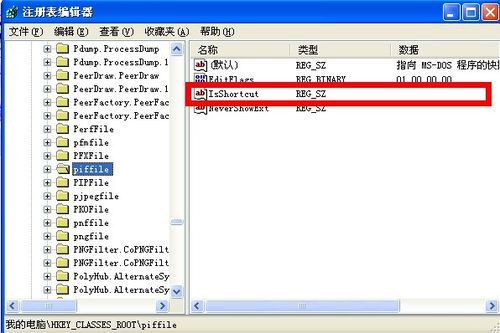
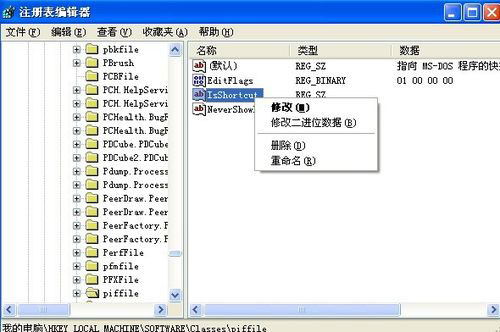
    piffile IsShortcut 刪除piffile IsShortcut
  4. 關閉註冊表 → 重開機 (或登出/登入)。
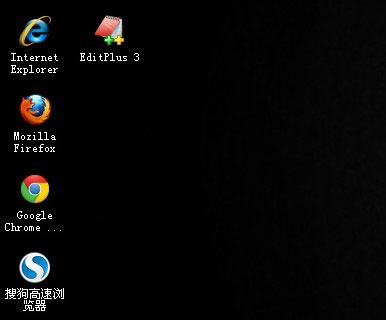
    桌面無小箭頭

原理與副作用

  • IsShortcut 為 Shell 擴充功能標記,告訴 Explorer 「此為捷徑,請疊加小箭頭圖示」。刪除後 Explorer 不再疊加。
  • 副作用:某些第三方主題/外殼擴充功能可能依賴此值,極少數情況下會導致捷徑右鍵選單異常,遇到即還原該值。

還原方法

在同兩個鍵值下右鍵 → 新增 → 字串值 → 名稱 IsShortcut → 數值留空 → 重開機。

四步驟、兩個值、一次重開機,桌面捷徑瞬間變純淨圖示,強迫症福音。

Copyright © Windows教程網 All Rights Reserved