XP 存取使用者資料夾提示「配額不足,無法處理此命令」,透過群組原則停用磁碟配額即可解決。
gpedit.msc 開啟群組原則編輯器。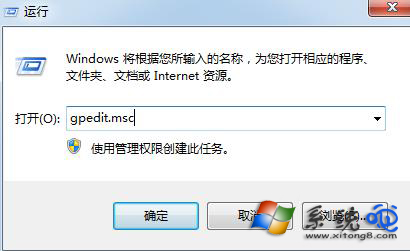
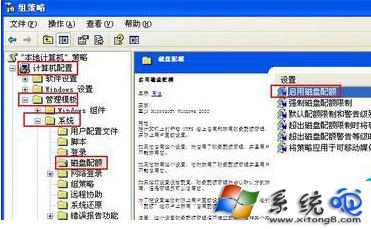
停用後即可正常存取檔案,不再受配額限制。此功能主要用於伺服器環境限制使用者磁碟使用量,個人電腦通常不需啟用。
Windows「執行」命令三大進階用法:一鍵叫出、快速啟動程式、隱藏私密軟體
玩轉 Windows「開啟方式」5 大高招:變更、新增、OpenExpert、軟體內建關聯、手動修改關聯
记事本自动添加日期时间:首行写.LOG(大写)即可,每次打开自动追加时间戳
Windows 系統維護五大核心原則:磁碟整理、登錄檔清理、非管理員操作、拒絕間諜軟體、防毒更新
Windows 系統操作 60 招精選:從視窗管理到登錄技巧的效率寶典
雙系統安裝完整指南:Win7 下裝 XP (傳統法 + Ghost 法) 與 XP 下裝 Win7 核心步驟詳解