Windows 98 線上更新僅限已註冊用戶。未註冊或重裝後未重新註冊的正版用戶亦無法使用。透過登錄表手動寫入「已註冊」標記即可繞過檢查。
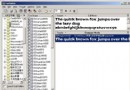
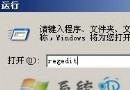
regedit 開啟登錄編輯器。HKEY_LOCAL_MACHINE\SOFTWARE\Microsoft\Windows\CurrentVersion。RegDone(值可為空)。CurrentVersion\Welcome。RegWiz。原理:模擬註冊精靈完成後的登錄痕跡,欺騙更新元件判定為已註冊用戶。
XP 開機提示「Windows 無法載入使用者設定檔」?修復登錄表 ProfileList 路徑
XP+SP2 系統屬性造假原理:修改 sysdm.cpl + OEM 資訊偽裝硬體規格
Windows XP 忘記密碼破解法(二):預設 Administrator 空密碼登入、密碼永不過期、密碼重設磁碟、登入介面切換
滑鼠亂舞非靈異事件:Nimda 病毒變種導致滑鼠失控,Symantec/Trend Micro 專用工具清除
Windows 隱藏檔案/資料夾顯示不出來?XP/Win7 雙系統完整解決方案(含登錄強制修復)