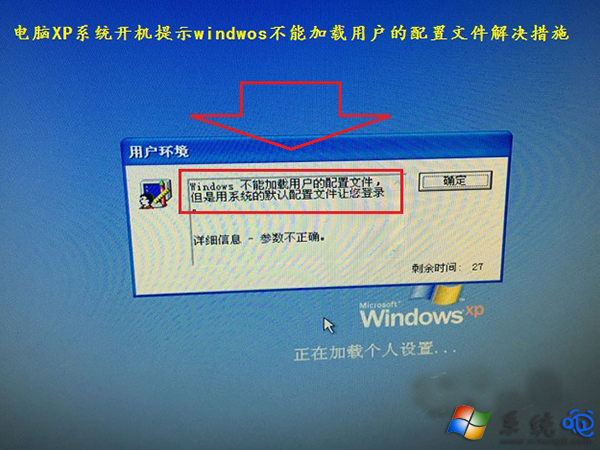
XP 開機錯誤「Windows 無法載入使用者的設定檔...參數不正確」,原因是登錄表 ProfileList 中 AllUsersProfile 與 ProfilesDirectory 鍵值路徑錯誤。
regedit 開啟登錄編輯器。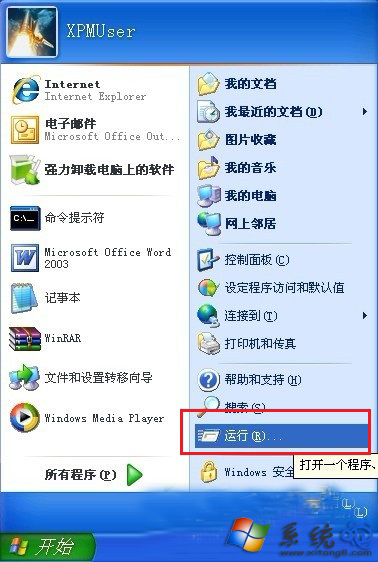
HKEY_LOCAL_MACHINE\SOFTWARE\Microsoft\Windows NT\CurrentVersion\ProfileList。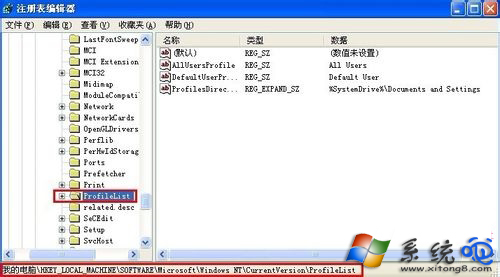
AllUsersProfile = All UsersProfilesDirectory = %SystemDrive%\Documents and Settings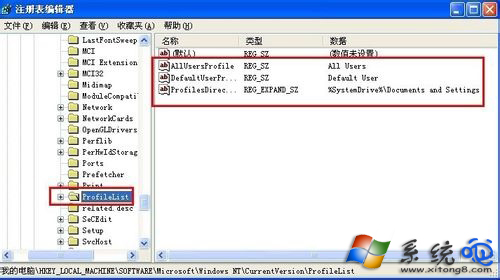
修改完成重開機即可正常載入使用者設定檔。此問題亦可能由登錄表損壞、病毒修改引起,建議修復後全盤掃毒。